If you’ve been wondering how to use Pinterest to drive traffic to your blog, you’re honestly asking the right question at the right time — because right now, Pinterest is quietly becoming the most underrated traffic source for bloggers on the internet.
I’ll show you exactly how to do it, step by step.
Quick Guide: Pinterest Traffic for Bloggers
| Step | What You’re Doing | Time Required |
|---|---|---|
| 1. Set up a business account | Switch from personal to pro | 10 minutes |
| 2. Optimize your profile | Keywords in name + bio | 20 minutes |
| 3. Create SEO-optimized boards | Keyword research for boards | 30–60 minutes |
| 4. Design scroll-stopping pins | Canva or a similar tool | Ongoing |
| 5. Write keyword-rich descriptions | Target what people search | Ongoing |
| 6. Post consistently | Schedule with a tool | Ongoing |
| 7. Track and optimize | Pinterest Analytics | Monthly |
Why Pinterest Works Differently Than You’d Think
Most bloggers assume Pinterest is just another social media platform. You post something pretty, you hope people see it, you get maybe three clicks and a lot of saves from people who will never read your blog. Classic.
But that’s not actually how Pinterest works — and that misunderstanding is exactly why so many bloggers give up on it too early.
Pinterest is a search engine, not a social feed. When someone opens Pinterest, they type in what they’re looking for — “easy weeknight dinners,” “budget travel Europe,” “how to start a blog.” They’re not passively scrolling. They’re actively searching with intent.
That means when your pin shows up for that search, you’re not interrupting anyone. You’re answering a question they already had.
And here’s what makes it even better: a pin you publish today can still drive traffic to your blog two or three years from now. Try getting that kind of longevity from an Instagram story. 🙂
Step 1: Set Up a Pinterest Business Account
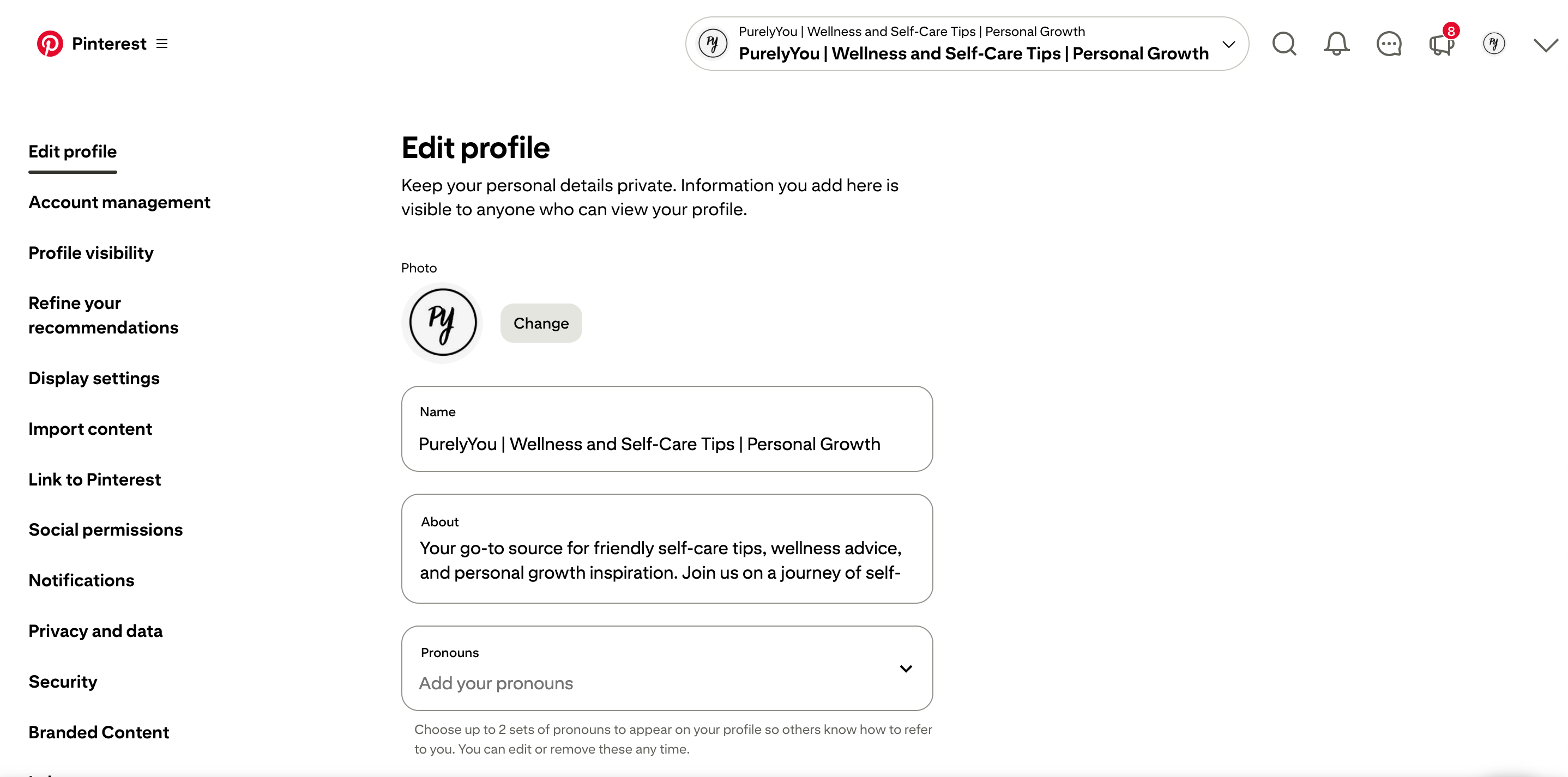
Before anything else, you need a Pinterest business account. Not a personal one — a business one. The difference matters because business accounts give you access to:
- Pinterest Analytics (you’ll need this to know what’s working)
- Rich pins (these pull metadata directly from your blog posts)
- The ability to claim your website
If you already have a personal account, you don’t need to start from scratch. Go to Settings → Account Management and convert it. Takes about 90 seconds.
Claim Your Website
After switching to a business account, claim your blog’s domain. Pinterest will give you a piece of code to add to your site header, or you can use your DNS settings. Once it’s verified, your profile picture shows up on every pin that links to your blog — small detail, big trust signal.
Step 2: Optimize Your Profile With Keywords
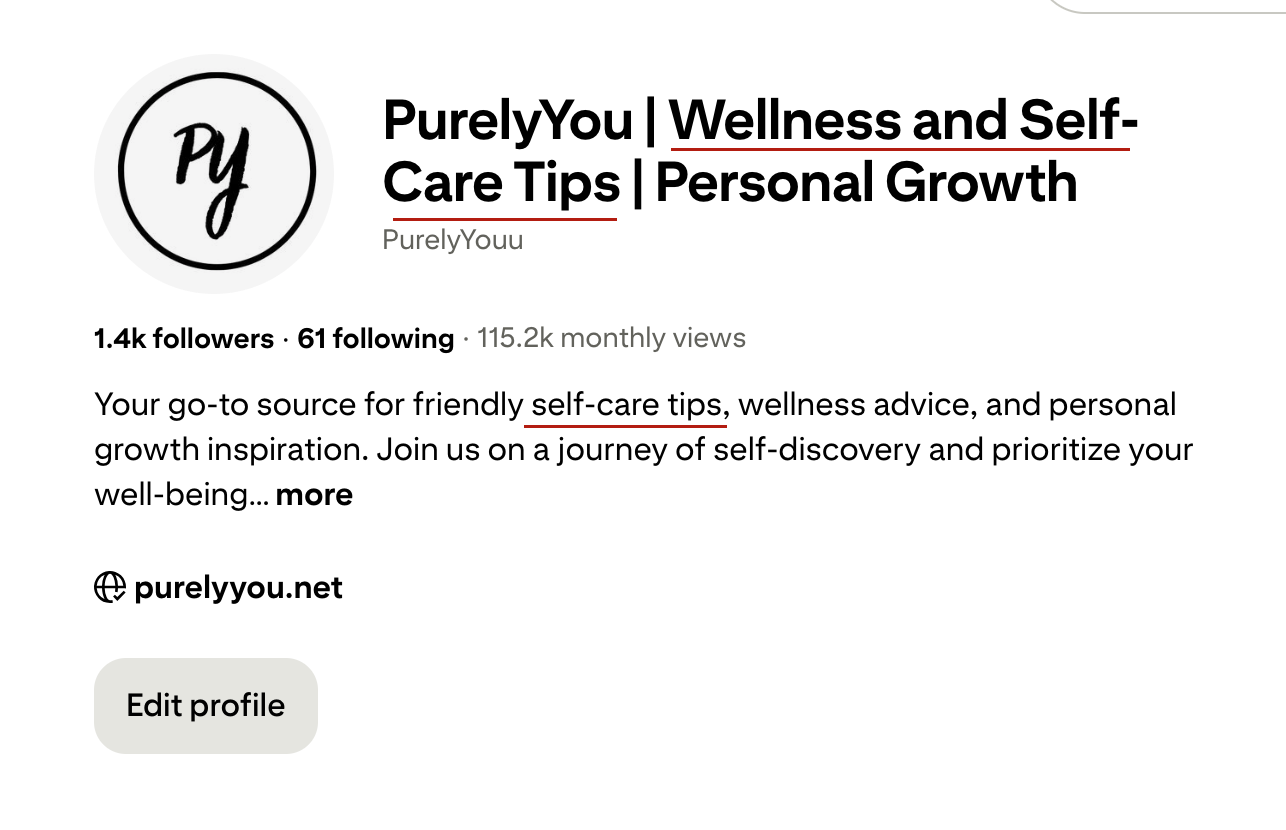
This is where most bloggers leave traffic on the table, FYI. They set up their profile name as just their blog name — like “Sarah’s Kitchen” — and write a bio that says something like “I love food and my dog.” That’s lovely, but Pinterest can’t search for “love food.”
Here’s what to do instead:
Your display name should include your blog name AND a keyword. Something like: “Sarah’s Kitchen | Easy Weeknight Dinner Recipes”
Your bio should read naturally but include 2–3 phrases people actually search for. Something like: “Sharing quick, budget-friendly dinner recipes for busy families. Weekly meal planning tips, 30-minute meals, and beginner-friendly cooking guides.”
Every word in that bio is searchable. That’s the difference between a profile that gets found and one that just sits there looking pretty.
Step 3: Create Boards the Right Way (This Is Where Most People Mess Up)
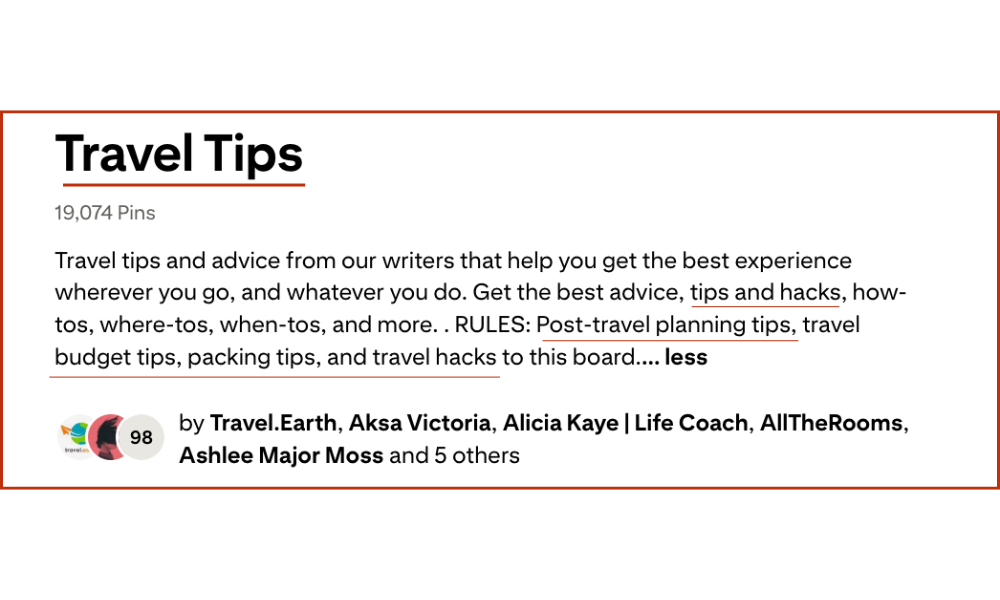
Your boards are not just organizational folders. They’re keyword-rich landing pages that Pinterest uses to understand what your content is about.
Here’s how to set them up properly:
Board Titles
Skip the cute names. “My Favorite Recipes 🍝” tells Pinterest nothing useful. “Easy Weeknight Dinner Recipes for Beginners” tells Pinterest exactly what that board covers — and exactly what searches it should show up in.
Board Descriptions
Each board needs a description of at least 2–3 sentences packed with natural keyword variations. Think about how someone would search for the content in that board, and write the description to match. Don’t keyword stuff — just be genuinely descriptive.
How Many Boards Do You Need?
Start with 8–12 boards that each cover a specific topic within your niche. You can expand over time, but a focused set of well-optimized boards beats 50 vague ones every time.
Step 4: Design Pins That Actually Get Clicked
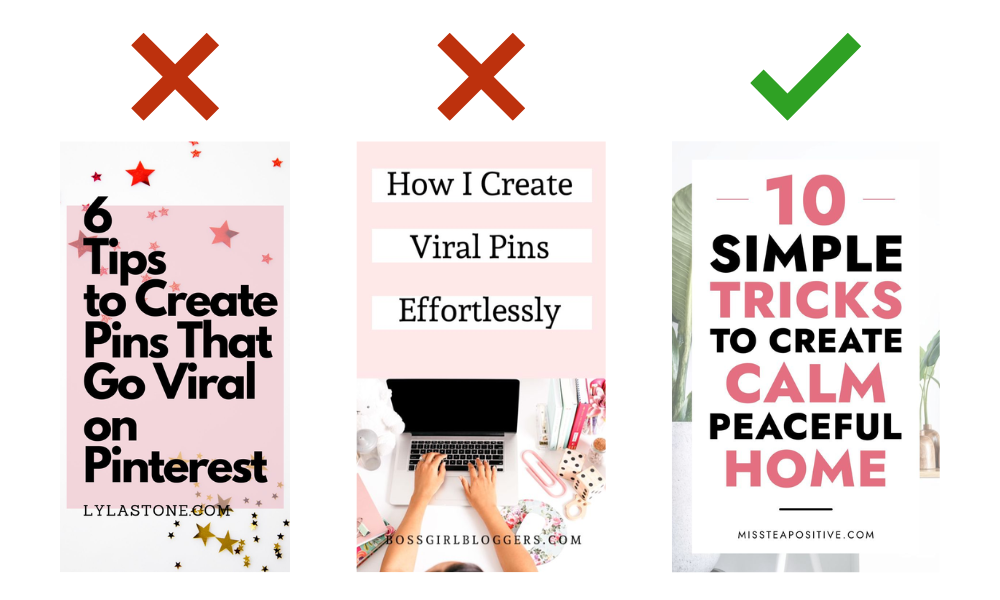
Here’s the thing about Pinterest pin design — it’s not about making something that looks like it belongs in a gallery. It’s about making something that makes someone stop mid-scroll and think “wait, I need to read that.”
What works on Pinterest in 2026:
- Tall pins — 2:3 ratio (1000 x 1500px is the sweet spot)
- Big, readable text — your headline should be readable on a phone screen without zooming in
- High-contrast colors — your text needs to pop against your background
- Your blog’s branding — consistent colors and fonts build recognition over time
- A clear benefit or curiosity hook — tell people what they’re getting or make them curious enough to click
What kills your click-through rate:
- Tiny text that no one can read on mobile
- Generic stock photos that look like every other pin in the feed
- No headline — just a picture with no context
- Cluttered layouts that make it hard to know what the pin is about
I use Canva for pin design — it’s free, it has Pinterest templates built in, and once you set up a branded template, you can crank out new pins in 5–10 minutes. Not everything needs to be a masterpiece. Consistency beats perfection on Pinterest.
Step 5: Write Pin Descriptions That Rank in Pinterest Search
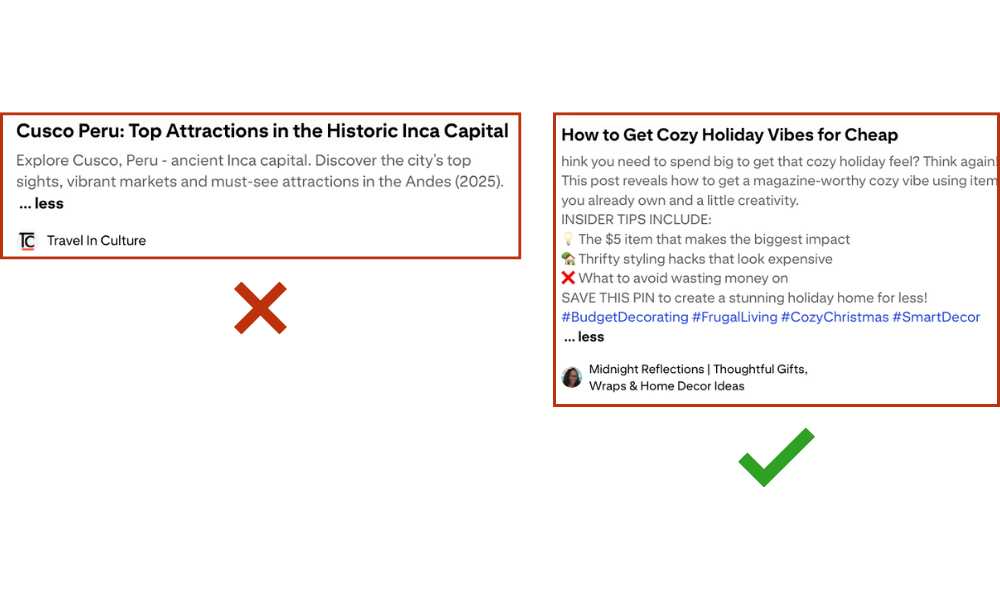
This step is often skipped, which makes it one of the biggest opportunities for bloggers who actually do it.
Every pin has a description field. Pinterest reads that description to understand what the pin is about and when to show it in search results. If you leave it blank or write “Check this out!” — Pinterest has no idea what to do with your pin.
A good pin description:
- Opens with the main keyword — naturally, not forced
- Reads like a helpful preview of what the blog post covers
- Includes 2–3 keyword variations sprinkled in naturally
- Has a soft call to action — “Save this for later” or “Click to read the full guide”
- Is 100–200 words — not too short, not an essay
Here’s a quick example of what a decent pin description looks like for a food blogger:
“Looking for easy weeknight dinner ideas that take 30 minutes or less? This list of quick family dinner recipes is perfect for busy nights when you still want something homemade. From simple pasta dishes to budget-friendly chicken recipes, these 30-minute meals are beginner-friendly and always a hit. Save this pin for your next meal planning session.”
See how that reads naturally but hits multiple search terms? That’s the goal.
Step 6: Post Consistently (This Is Non-Negotiable)
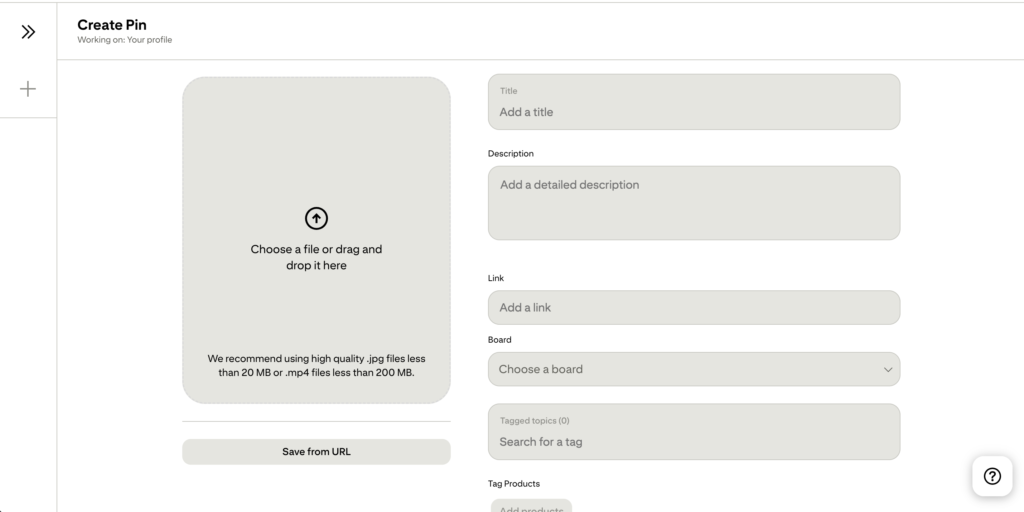
Pinterest rewards consistency more than volume. You don’t need to post 50 pins a day — that advice is outdated and honestly exhausting. But you do need to show up regularly.
A realistic posting strategy for bloggers:
- 5–15 fresh pins per day is a solid range for most bloggers
- Spread your pins throughout the day rather than dumping them all at once
- Create multiple pin designs for each blog post — different images, different headlines, same URL
- Don’t just repin other people’s content — Pinterest now heavily prioritizes fresh, original pins that link to your own content
Use a Scheduling Tool
Manually posting every day is a recipe for burnout. Tools like Tailwind let you batch-schedule pins in advance so your account stays active even when you’re not. IMO, this is one of the best investments you can make once you’re serious about Pinterest.
Step 7: Track Your Results and Optimize
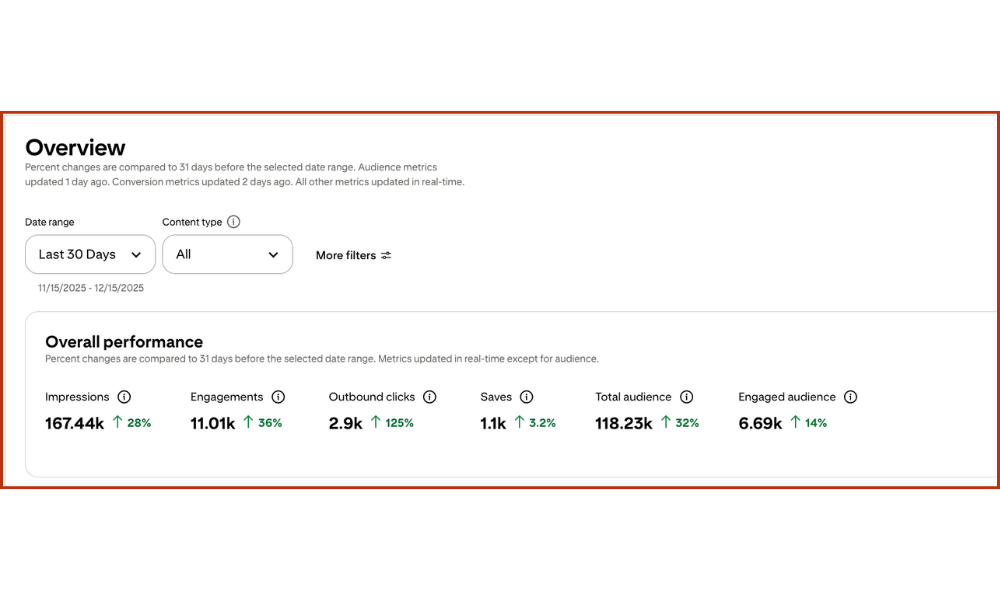
The only metric that actually matters for bloggers is outbound clicks — the number of people who clicked through from your pin to your blog. Not impressions. Not saves. Clicks.
Log into your Pinterest Analytics once a month and look at:
- Which pins are getting the most outbound clicks?
- Which boards are driving the most traffic?
- What topics are performing best?
Then do more of what’s working. If your “30-minute dinner” pins are crushing it and your “kitchen organization” pins are getting nothing — you know where to focus your energy.
What to do if nothing is working:
- Check your pin designs — are they readable on mobile?
- Check your descriptions — are you including keywords people actually search for?
- Check your boards — are they specific and keyword-optimized?
- Check your consistency — have you been posting regularly for at least 60 days?
Pinterest takes time to build momentum. Most bloggers quit after 30 days and miss the point where things actually start compounding. Don’t be that person.
How Long Does Pinterest Take to Drive Traffic to a Blog?
Realistic answer: you’ll start seeing movement in 30–60 days, but real compounding traffic usually kicks in around month 3.
Pinterest is not Google SEO where you wait 6–12 months for a result. But it’s also not Instagram where you can go viral overnight. It’s somewhere in the middle — steady, consistent, and extremely durable once it gets going.
The bloggers who struggle with Pinterest are usually the ones who treat it like a sprint. It’s a marathon. A slow one at first — and then suddenly you look at your analytics and Pinterest is sending you more traffic than Google ever did.
RELATED BLOG POST: How Long Pinterest Really Takes to Work (With Realistic Timelines)
Common Pinterest Mistakes Bloggers Make
Since we’re here, let me save you some pain:
- Posting only to group boards — group boards are mostly dead. Focus on your own boards.
- Using the same pin design for every post — Pinterest shows variety. Create 3–5 different pin designs per blog post.
- Ignoring mobile optimization — most Pinterest users are on their phones. If your pin text is tiny, no one’s clicking.
- Not linking directly to the blog post — every pin should link to the specific post, not just your homepage.
- Giving up too early — this one gets more bloggers than anything else.
Do You Actually Want to Do All of This?
Here’s the honest truth: this system works. But it’s also a lot — keyword research, pin design, descriptions, scheduling, analytics, optimization — every single month.
If you’re a blogger who’s already stretched thin between writing content, managing your site, and actually living your life, adding a full Pinterest strategy on top of that is… a lot. :/
That’s exactly why I offer done-for-you Pinterest management for bloggers — I handle the strategy, the pin creation, the SEO, and the scheduling so you can focus on writing while Pinterest builds your traffic in the background. If that sounds like something worth exploring, you can grab a free Pinterest audit over at AM Socials and I’ll show you exactly what’s working, what isn’t, and what I’d fix first.
No pressure though — even if you go the DIY route, everything you need is in this guide.
The Bottom Line
Pinterest is one of the best traffic sources available to bloggers right now — especially with Google being the unpredictable mess it’s been lately. It rewards consistency, rewards good SEO, and rewards bloggers who actually take the time to do it properly.
Set up your business account. Optimize your profile and boards with real keywords. Design pins that are built to get clicked. Write descriptions that help Pinterest understand what you’re publishing. Show up consistently. Track your outbound clicks. Adjust what isn’t working.
That’s it. That’s the whole system. Now go build your traffic source that Google can’t touch.
RELATED BLOG POST: Pinterest SEO for Bloggers: The Complete Beginner’s Guide (2026)
Frequently Asked Questions
How many pins should I post per day as a blogger? Somewhere between 5 and 15 fresh pins per day is a solid range for most bloggers. Quality matters more than volume — a well-designed, keyword-optimized pin will always outperform 10 lazy ones. Focus on creating 3–5 different pin designs for each blog post and scheduling them out over time rather than flooding your account all at once.
Does Pinterest SEO actually work for small blogs? Yes — and honestly, this is where smaller blogs have an advantage over big brands. Pinterest’s search algorithm doesn’t heavily weight domain authority the way Google does. A well-optimized pin from a small blog can outrank a big site if the keyword targeting and design are done right. Focus on niche-specific keywords with genuine search demand rather than trying to compete on ultra-broad terms.
How do I know if my Pinterest strategy is working? Check your outbound clicks in Pinterest Analytics — that’s the number of people who clicked from your pin to your blog. If that number is growing month over month, your strategy is working. If it’s flat or declining, look at your pin designs, your keyword targeting in descriptions, and your consistency. Most stalls come down to one of those three things.




Leave a comment