If you’re staring at your Pinterest Analytics wondering why your pins aren’t getting clicks despite a decent impression count, you’re not alone — and you’re definitely not doing something wrong with your content.
You spent three hours designing that pin. The image is sharp. The colors are on-brand. And yet Pinterest sent it to 400 people, and exactly two of them clicked. Two. The rest just… scrolled past. That gap between impressions and outbound clicks is where most bloggers quietly lose their minds — and where most Pinterest strategies fall apart.
Quick Guide: Why Pins Fail to Get Clicks
| Problem | What’s Actually Happening | Quick Fix |
|---|---|---|
| High Impressions, zero clicks | Pin attracts saves but doesn’t promise a reason to click | Add a curiosity hook or specific benefit to pin title |
| Pin buried in search results | Weak keyword targeting in title and description | Research exact Pinterest search phrases and use them |
| Pin design looks complete | Reader got all the value from the pin itself | Tease content — don’t give it all away on the pin |
| Wrong audience seeing it | Board structure mismatched to pin topic | Align board keyword with pin keyword tightly |
| Inconsistent posting | Algorithm deprioritizes inactive accounts | Schedule 5–15 pins daily using Tailwind |
| Low-quality landing page | High bounce rate signals poor content match | Make sure pin promise and blog post deliver match |
| Poor mobile readability | Text too small to read on a phone screen | Use bold fonts, min 24pt, high contrast only |
The Real Difference Between Impressions and Outbound Clicks
Here’s the uncomfortable truth most Pinterest guides skip: impressions mean Pinterest showed your pin. Clicks mean your pin gave someone a compelling enough reason to stop, tap, and leave Pinterest.
Those are two completely different problems. And solving one has nothing to do with solving the other.
When analyzing Pinterest accounts across food, finance, lifestyle, and home niches, one pattern shows up constantly — bloggers optimize for impressions (better keywords, more pins) without ever fixing the click problem (weak pin design, missing hook, wrong intent targeting). You can have 50,000 monthly impressions and 11 outbound clicks. Those numbers are not contradictions. They’re a diagnosis.
The click is won or lost in about 0.4 seconds. That’s how long a Pinterest user actually looks at your pin before deciding to scroll past. Everything we cover below comes back to that window.
Reason 1: Your Pin Title Is Doing Nothing
The pin title is the single highest-leverage piece of text on your entire pin. Not the image. Not the description. The title — because Pinterest indexes it heavily for search, and readers scan it instantly.
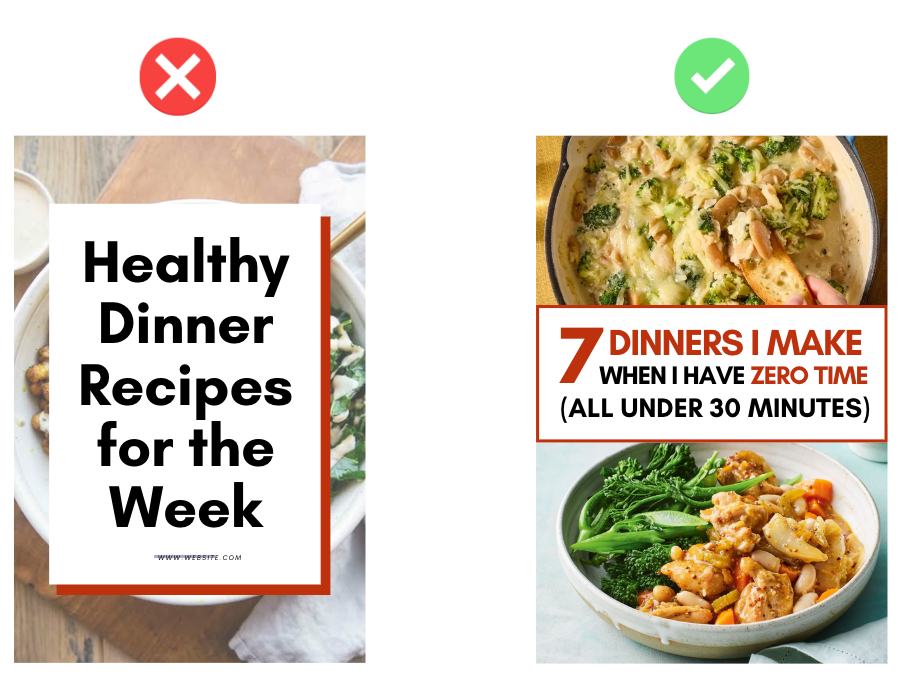
Most bloggers write pin titles that sound like article headlines. Something like: “Healthy Dinner Recipes for the Week.” That’s a category. It’s not a reason to click.
What actually gets clicks is specificity + a promised outcome or a curiosity gap.
Compare these:
- ❌ “Healthy Dinner Recipes for the Week”
- ✅ “7 Dinners I Make When I Have Zero Time and Zero Ideas (All Under 30 Minutes)”
The second one does three things the first one doesn’t: it’s specific, it talks to a feeling the reader already has, and it promises a tangible outcome. That’s the difference between a scroll and a click.
How to Write Pin Titles That Actually Convert
- Lead with the specific benefit or the specific number. “5 Ways to…” always outperforms “Ways to…” because specificity signals you actually know what you’re talking about.
- Speak to the emotion, not just the topic. “Budget Meal Prep Ideas” is a topic. “How I Feed My Family for $60 a Week Without Losing My Mind” is an emotion. One of those gets clicked.
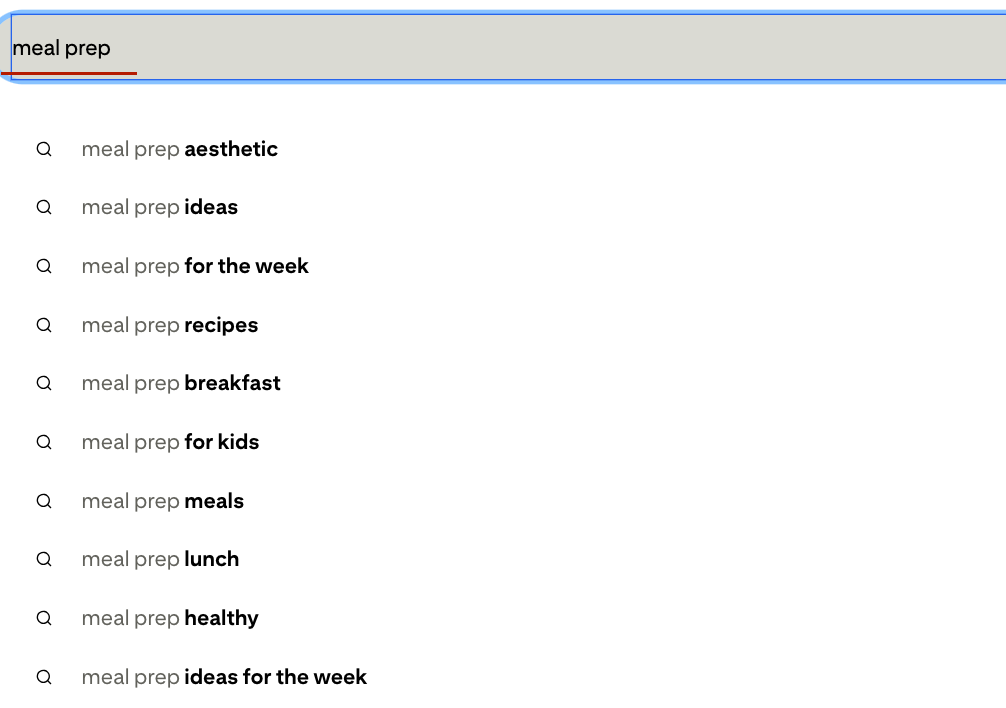
- Use the words your reader would type into Pinterest. If you’re not sure, open Pinterest in an incognito window and start typing your topic into the search bar. The autocomplete suggestions are your readers telling you exactly what they want.
- Keep it under 100 characters. Pinterest truncates long titles on mobile, and most of your readers are on mobile.
Pro Tip: Write three different title versions for every pin you create. Use the one that makes you want to click it yourself. If you’d scroll past it, so will everyone else.
Reason 2: Your Pin Design Gives Away Too Much
This one is counterintuitive, and it trips up a lot of bloggers who genuinely care about design. A well-designed pin that fully communicates the blog post’s value will get saved. It won’t get clicked.
Think about it from the reader’s perspective. If your pin says “5 Ways to Save Money on Groceries” and then lists all five ways right there on the image — why would they click through? They already have the information. Pinterest just became their blog post.
Your pin should tease the value, not deliver it.
The goal is to give the reader just enough to understand what they’re getting and want more of it — not enough to feel satisfied without clicking. This is what copywriters call an “open loop.” You open a question in the reader’s mind that can only be closed by clicking through to your blog.
Pin Design Rules That Drive Clicks
- Use your headline as a hook, not a summary. “The Grocery Trick That Cut My Bill in Half” is a hook. “5 Ways to Save on Groceries” is a summary. Hooks create curiosity. Summaries close it.
- Include a visual that creates context but not completion. A photo of a beautifully organized pantry creates curiosity. A photo with text listing every organization tip closes the loop before the click.
- Add a subtle CTA element. A small arrow, a “tap to read” badge, or even the word “guide” in the title signals that more value exists beyond the pin itself.
- Make your brand identity recognizable. Consistent colors and fonts across all your pins mean that when someone’s seen your content before and liked it, they’ll click again on instinct. Brand recognition on Pinterest compounds over time.
Pro Tip: FYI — the most-clicked pins across successful blogging accounts are rarely the prettiest ones. They’re the ones with the clearest, most specific headline and a visual that makes you feel like you’re missing something by not clicking.
Reason 3: You’re Targeting the Wrong Keywords
Pinterest is a search engine. The keywords you use in your pin title, description, and board title determine which searches your pin appears in — and whether the people seeing it are actually looking for what you’re writing about.
When your keywords are too broad, Pinterest shows your pin to a general audience that isn’t specifically looking for your content. When your keywords don’t match your pin’s actual content, Pinterest shows it to the wrong people entirely. Either way, you get impressions from people who have no reason to click.
The keyword problem explains a huge portion of “high impressions, low clicks” situations.
How to Find the Right Pinterest Keywords
Step 1: Use Pinterest’s own search bar in incognito. Type your broad topic and watch the autocomplete. Those suggestions are what real users are actually searching right now. “Meal prep” might autocomplete to “meal prep for beginners on a budget” — that’s a keyword with a specific audience and intent attached to it.
Step 2: Check the guided search bubbles. After you search a term, Pinterest shows clickable topic bubbles under the search bar. These are interest clusters Pinterest uses to categorize content. If you include those terms naturally in your pin descriptions, Pinterest can categorize your content more accurately — which means it shows your pin to higher-intent searchers.
Step 3: Look at what’s already ranking. Search your target keyword and study the top-ranking pins. What do their titles have in common? What phrases repeat across multiple top pins? Those patterns tell you exactly what Pinterest’s algorithm rewards for that search.
Step 4: Use long-tail keywords instead of broad ones. “Recipes” is a keyword. “Quick weeknight dinner recipes for picky eaters” is a keyword with intent. Long-tail keywords have less competition and attract readers who know exactly what they’re looking for — which means a much higher chance they’ll click when they find your pin.
Pro Tip: After you find a strong keyword, use it in the pin title, in the first sentence of the description, and in the board name where you post it. Pinterest reads all three — and using the same keyword across all three helps the algorithm understand your content faster.
Reason 4: Your Pin Description Is Empty or Generic
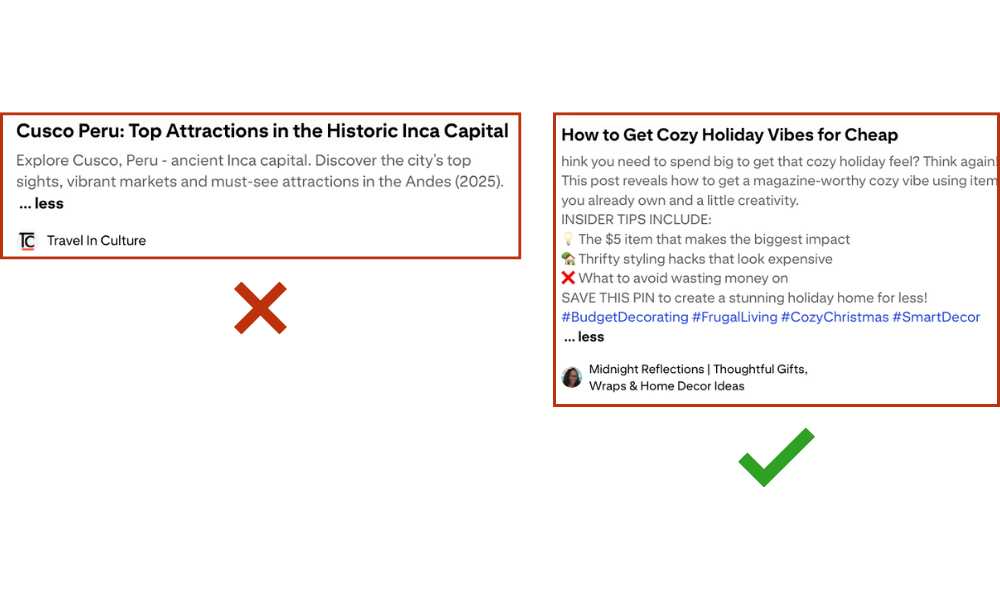
Most bloggers either skip the pin description entirely or write something like: “Check out my latest blog post for more tips!”
That is not a description. That’s wasted real estate.
Pinterest gives you 500 characters in the description field and reads every single word to understand what your pin is about. A blank description is telling the algorithm: “I don’t know what this pin is about.” A generic description is only slightly better. Both hurt your distribution and your click rate.
A strong pin description does three things: it uses keywords, it previews value, and it ends with a reason to click.
What a Good Pin Description Looks Like
Here’s a before and after for a personal finance blogger:
Before (generic): “Save money on groceries with these helpful tips! Click the link for more.”
After (keyword-rich, value-previewing, click-driving): “Struggling to cut your grocery bill without cutting everything you actually like to eat? These budget grocery shopping tips show you exactly how to reduce your weekly spend without meal prepping sad salads every Sunday. Includes a free printable grocery list template. Save this pin for your next shopping trip.”
The second one is specific, it speaks to a real frustration, it mentions a bonus (the printable), and it ends with a reason to save AND a CTA. That’s what every description should aim for.
Pro Tip: End your descriptions with a soft call to action — “save this pin,” “click to read the full guide,” or “tap for the free checklist.” Don’t be pushy about it. Just make the next step obvious.
Reason 5: Your Boards Are Sending Mixed Signals
Here’s something most bloggers don’t think about: your board structure tells Pinterest’s algorithm what kind of content you publish and which audiences you serve. If your board structure is messy, broad, or mismatched to your pin topics, Pinterest struggles to categorize your pins accurately — which means it distributes them to the wrong people.
A pin about “30-Minute Budget Dinners” posted to a board called “My Favorite Things” is a categorization nightmare for Pinterest. The algorithm has no idea who to show it to.
Board Optimization That Improves Click Rates
- Name your boards with specific, searchable keyword phrases. “Budget Dinner Recipes” beats “Recipes I Love” every single time — not just for SEO, but because it tells Pinterest exactly who to surface your pins to.
- Write a board description for every single board. Include 2–3 natural keyword variations in that description. This is one of the most consistently skipped steps in Pinterest optimization, which makes it one of the highest-opportunity fixes.
- Match your pin to the most specific board possible. A pin about “Quick Breakfasts for Busy Moms” belongs in “Quick Breakfast Recipes” or “Easy Morning Meal Ideas” — not in your general “Food” board.
- Audit your boards every few months. Remove boards that have nothing to do with your niche. Pinterest looks at your entire account to understand what you’re about. A cooking blogger with a board called “Dream Weddings” is sending confusing signals to the algorithm.
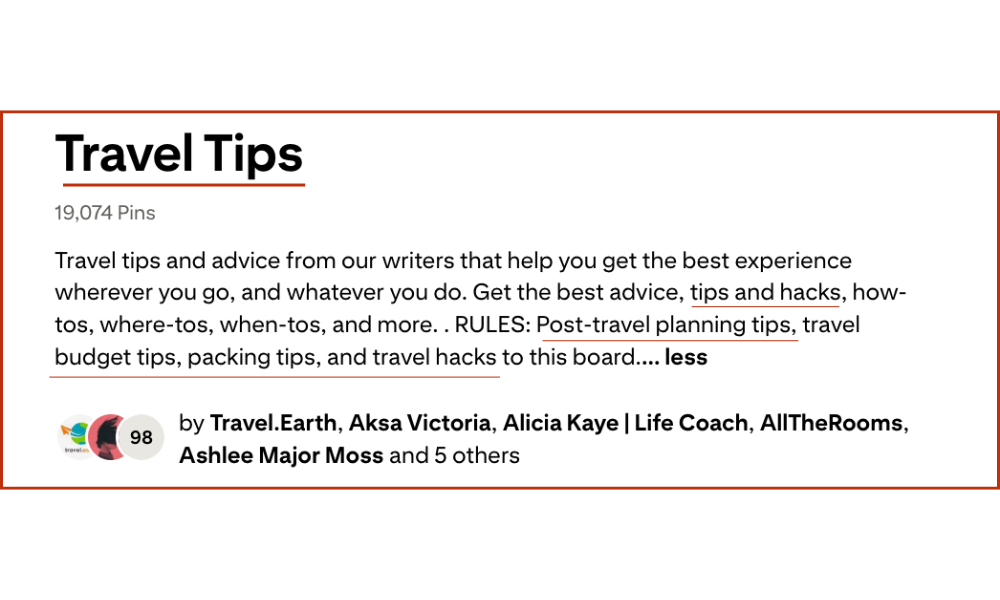
Reason 6: Your Click-Through Rate Is Hurting Your Distribution
This is the feedback loop most bloggers don’t know exists: Pinterest uses your click-through rate as a signal to decide whether to keep distributing your pin.
When your pin gets many impressions, but few clicks, Pinterest interprets that as: “People saw this pin and didn’t want it.” So it slows down distribution, which leads to fewer impressions. Which makes it even harder to recover the click rate. Which leads to even less distribution. It’s a downward spiral that’s painful to watch in your analytics.
Fixing the click rate early — in the first 30 days of a pin — is critical to breaking that loop.
This is exactly why pin title and design matter so much upfront. You want the click rate to signal to Pinterest that people who see this pin actually want it. That signal is what earns you more distribution, which compounds into more traffic over time.
Pro Tip IMO — when a pin is underperforming in the first 30 days, don’t delete it and start over. Create a new pin with a different title or design pointing to the same URL and let the new version compete. Pinterest treats each pin as a separate asset.
Common Pinterest Mistakes vs. High-Converting Pin Tactics
| What Most Bloggers Do | What Actually Gets Clicks |
|---|---|
| Broad pin title that describes the topic | Specific title with a promised outcome or curiosity gap |
| Pin image that shows the full answer | Pin image that teases the value and creates an open loop |
| Generic board names like “Food” or “Tips” | Keyword-specific board names like “Easy Budget Dinner Recipes” |
| Empty or one-line pin description | 100–200 word description with keywords, value preview, and CTA |
| One pin design per blog post | 3–5 different pin versions per URL, tested over time |
| Posting in bursts when you remember | 5–15 pins scheduled daily via a tool like Tailwind |
| Checking impressions to measure success | Tracking outbound clicks as the only metric that matters |
| Designing pins that look beautiful but are vague | Designing pins that are readable at thumbnail size with a clear hook |
Ready to Stop Guessing and Actually Fix Your Pinterest Traffic?
Here’s the honest version of what this article is really saying: fixing your Pinterest click rate isn’t complicated, but it does require consistent attention across your titles, designs, descriptions, boards, and posting frequency — every single month.
That’s a lot to manage on top of actually running a blog. Most bloggers I talk to know exactly what they should be doing on Pinterest. The problem isn’t knowledge. It’s bandwidth.
If you want someone to handle the strategy, the keyword research, the custom pin design, the scheduling, and the monthly optimization — while you focus on writing — that’s exactly what we do at AM Socials. We manage Pinterest specifically for bloggers, and we track one metric: outbound clicks back to your blog. Not impressions, not saves, not follower counts. Clicks.
Start with a free Pinterest audit. I’ll record a short Loom video walking through your specific account and showing you exactly what’s killing your click rate right now — and what I’d fix first. No pitch, no template report. Just a real look at your account. Request your free audit here →
Frequently Asked Questions About Pinterest Traffic
Why do my pins get impressions but no clicks?
Impressions tell you Pinterest showed your pin to someone. Clicks tell you that person found the pin compelling enough to leave Pinterest and visit your blog. These are two separate problems. High impressions with low clicks almost always mean one of three things: your pin title doesn’t promise a specific benefit or create curiosity, your pin design delivers the value before the reader clicks (so they don’t need to), or you’re targeting keywords that attract the wrong audience — people who are browsing, not looking for what you actually write about. Fix the title first. That single change produces the fastest improvement in click rate.
How many pins should I post per day to improve my click rate?
Consistency matters more than volume. Posting 5–10 fresh pins per day on a reliable daily schedule outperforms dumping 50 pins in one day and going quiet for a week. Pinterest’s algorithm reads consistency as a trust signal — accounts that show up regularly get distributed more reliably. The other thing that dramatically helps your click rate is creating multiple different pin designs for each blog post URL. Test different titles, different images, different color combinations. Pinterest treats each pin as a separate asset, so one URL can have several different pins competing to find the format that your audience responds to best.
Does the board I post a pin to affect how many clicks it gets?
Yes, significantly. Pinterest uses your board’s name, description, and category to understand what your pin is about and who to show it to. A pin posted to a vague, poorly-named board (“My Stuff,” “Inspiration”) gets distributed to a broad, untargeted audience — and a broad audience has a low click rate because most of them aren’t looking for your specific content. Post each pin to the most specific, keyword-optimized board that matches that pin’s topic. A food blogger’s pin about quick breakfast recipes belongs in “Easy Breakfast Recipes for Busy Mornings” — not in “Breakfast” and definitely not in “Recipes I Want to Try.”
How long does it take for a new pin to start getting clicks?
Pinterest tests new pins in small batches before deciding how widely to distribute them. This testing phase typically takes 2–4 weeks. During that window, you might see very few impressions and almost no clicks — that’s normal, not a sign the pin is failing. The clicks you care about usually start appearing in weeks 3–6. Some pins continue gaining momentum for months or even years after publication, which is what makes Pinterest fundamentally different from social media platforms. The key is not to delete underperforming pins too early. Give each pin at least 30 days before concluding it isn’t working, and when something does underperform, create a new pin with a different title rather than abandoning the URL entirely.
What’s the most important thing to fix first if my click rate is low?
Start with your pin titles. The title is the highest-leverage element on your pin because Pinterest indexes it for search and readers scan it in under a second. A pin with a great image but a weak title will consistently underperform a pin with an average image and a specific, curiosity-driving title. Write at least three title versions for your next batch of pins, pick the one that would make you stop scrolling, and track which approach generates the most outbound clicks over 30 days. Once you see a pattern in what your specific audience responds to, double down on that format across all your pins.

Leave a comment