
Pinterest vs Google for bloggers is one of those debates that sounds like a real strategic question but is actually built on a false premise — because you shouldn’t be choosing between them at all.
Most bloggers treat traffic like a single-source problem. They go all-in on Google SEO, spend months building backlinks and optimizing posts, and then one core update wipes out six months of work in 48 hours. Or they hear Pinterest is an untapped goldmine, spend weeks creating pins, and get confused when the traffic doesn’t replace their Google sessions. The problem isn’t either platform.
The problem is treating them as competitors when they’re actually designed to do completely different things.
Key Takeaways
- Pinterest and Google serve different search intents and different audience behaviors — running both simultaneously gives you two independent traffic streams that don’t compete with each other.
- Google traffic is text-driven, answer-seeking, and volatile with algorithm updates. Pinterest traffic is visual, inspiration-driven, and compounds over time without the same volatility risk.
- A blog post can rank on Google for a keyword and drive Pinterest traffic from a completely separate audience at the same time — these are not the same people searching the same way.
- For bloggers monetizing through ads or affiliates, Pinterest-referred traffic tends to generate stronger page engagement because the user arrived with specific intent and is in a discovery mindset rather than a quick-answer mindset.
- The smartest traffic strategy for bloggers in 2026 is not Pinterest vs Google — it’s Pinterest AND Google, built as independent systems that protect each other when one fluctuates.
Why This Question Keeps Coming Up
The Pinterest vs Google debate exists mostly because bloggers are scared. Scared of spreading too thin. Scared of learning another platform. Scared of investing time in something that might not pay off.
That’s a legitimate concern — time is the real currency when you’re running a blog. But the framing of the question is the problem. Nobody asks “should I focus on email or SEO?” because it’s obvious they serve different purposes. Pinterest vs Google deserves the same clarity.
The reason bloggers started asking “which should I focus on?” is because Google HCU (Helpful Content Update) wiped out enormous amounts of organic traffic across blogging niches in 2023 and 2024. Bloggers who’d built everything on Google suddenly needed an alternative. Pinterest became the obvious candidate. But instead of adding it as a second stream, many bloggers approached it as a Google replacement — which is both strategically wrong and practically unnecessary.
How Google Actually Works for Bloggers
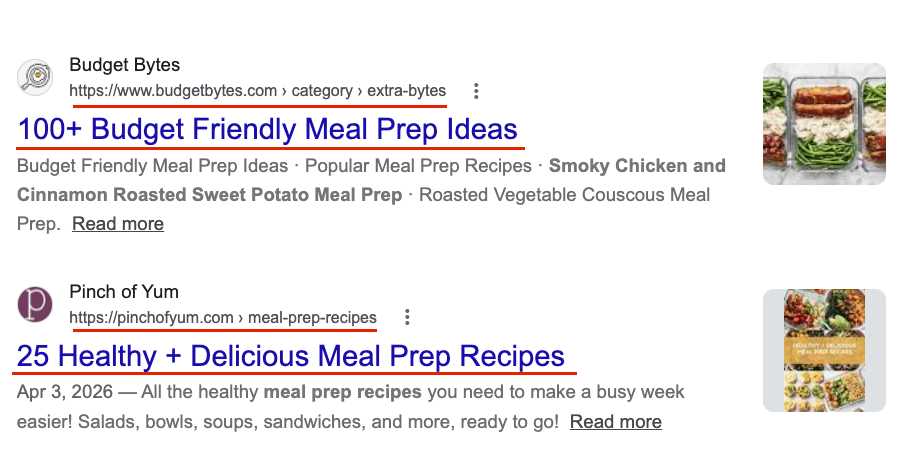
Google is a text-first search engine optimized for delivering specific, direct answers to specific questions. When someone types “how to remove a red wine stain” into Google, they want the fastest, most authoritative answer. They’re not browsing. They’re not saving things for later. They’re finding an answer and moving on.
For bloggers, this creates a few important realities:
- Google traffic is high-intent but transactional. The user wants their question answered quickly, which means your bounce rate will be higher and your page engagement shorter compared to other traffic sources.
- Google rankings take time. A new blog post can take 4 to 12 months to rank meaningfully for a competitive keyword, and building domain authority is a multi-year process.
- Google traffic is vulnerable to algorithm updates. A single core update can move your rankings significantly in either direction overnight — which is exactly what happened to thousands of bloggers between 2022 and 2024.
- Google rewards E-E-A-T signals. Experience, expertise, authoritativeness, and trustworthiness are increasingly embedded into how Google evaluates content — which favors established blogs over new ones.
Google is genuinely powerful for bloggers. It creates high-intent, targeted traffic that converts well for affiliate marketing and email list building. The problem is not that Google is unreliable — it’s that building a blog entirely on Google creates a single point of failure that every algorithm update can exploit.
How Pinterest Actually Works for Bloggers
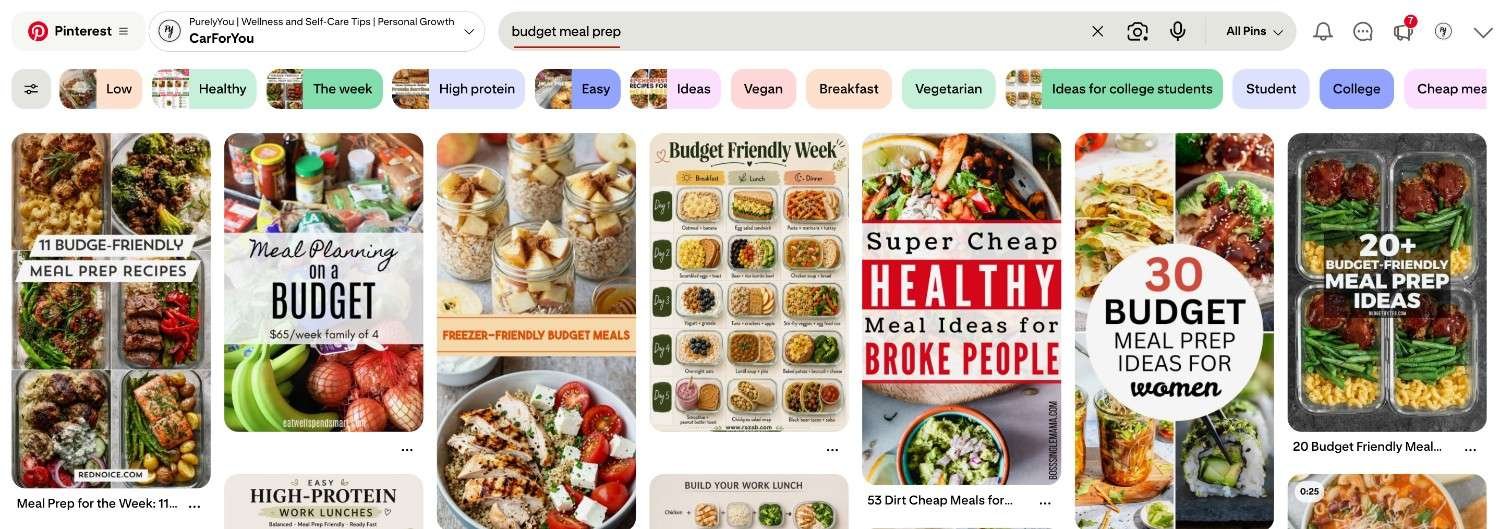
Pinterest is a visual search engine, not a social media platform. That distinction is the most important thing to understand before comparing it to Google.
When someone opens Pinterest, they’re not looking for a specific answer. They’re searching for inspiration, ideas, and solutions they want to save, reference later, and act on over time. Someone searching “budget meal prep” on Pinterest isn’t in a hurry. They’re planning. They want to collect ideas, compare approaches, and build a reference library for when they’re ready to act.
This creates a completely different reader behavior compared to Google:
- Pinterest traffic is discovery-driven. Users arrive at your blog in an exploratory mindset, which means they spend more time on page and are more likely to browse multiple posts.
- Pinterest content has a long lifespan. A pin you publish today can resurface and drive traffic 2 to 3 years later without any additional work on your part — which is fundamentally different from how Google handles content freshness.
- Pinterest doesn’t punish new blogs. Unlike Google, where domain authority matters enormously for competitive keywords, Pinterest ranks pins based on keyword relevance, pin quality, and engagement signals — which means a new blog with well-optimized pins can compete with established accounts from month one.
- Pinterest traffic is independent from Google’s algorithm. When a Google core update hits, your Pinterest traffic doesn’t notice. These are completely separate systems with completely separate user bases.
For the full strategic setup — from account optimization through board structure through pin SEO — the complete guide to using Pinterest to drive blog traffic covers the exact execution framework.
The Key Differences That Actually Matter for Bloggers
User Intent: Answers vs Discovery
Google users search with specific intent and want a direct answer as fast as possible. Pinterest users search with exploratory intent and want ideas to save, collect, and act on later.
This matters for how you write and format content. Google rewards comprehensive, well-structured answers that get to the point quickly. Pinterest rewards content that creates enough curiosity to click through, then delivers enough value to save and share.
The same blog post can satisfy both — but the pin design and headline that drives Pinterest clicks will look very different from the meta title and description that drives Google clicks.
Content Lifespan: Months vs Years
A Google-ranked page holds its position as long as it maintains relevance, fresh content, and backlink authority. The moment a competitor publishes something better or an algorithm update shifts priorities, your ranking moves.
A Pinterest pin has no expiration date. It gets indexed, categorized, and surfaced for relevant searches indefinitely. Old pins resurface seasonally. Pins you published 18 months ago can spike in traffic if a seasonal keyword trend aligns with them again. That compounding behavior is something Google simply doesn’t offer at the same scale for bloggers without significant domain authority.
Traffic Volatility: High vs Low
This is where Pinterest’s case as a Google complement gets strongest. Google traffic is prone to significant swings — a helpful content update, a core algorithm change, a competitor earning a featured snippet on your keyword. Any of these can cut your Google traffic substantially in a short period.
Pinterest traffic, by contrast, builds gradually and drops gradually. The accounts that see sudden Pinterest traffic drops almost always have a specific technical or strategic cause — a broken link, an abrupt posting consistency break, or a major pin design shift — rather than an arbitrary algorithm decision that affected thousands of blogs simultaneously.
Pro Tip: If you’re currently dependent on Google for more than 70% of your blog traffic, Pinterest isn’t optional — it’s insurance. Building Pinterest traffic means that the next Google core update affects your total traffic by less, because Pinterest holds steady while Google fluctuates.
Monetization Behavior: RPM Comparison
When analyzing Google Analytics data across blogging niches, a consistent pattern emerges: Pinterest-referred traffic tends to generate stronger display ad revenue per session in content niches like food, home, lifestyle, and finance. The reason is behavioral — Pinterest users arrive in a browsing mindset rather than a quick-answer mindset, which means they spend more time on page, view more ads, and click more affiliate links before leaving.
This isn’t universal across every niche — but for bloggers on Mediavine or Raptive whose RPM depends on session duration and page views per visit, the quality of Pinterest traffic is often measurably better than the raw volume number suggests.
When to Lean Into Google vs Pinterest
Both platforms deserve investment, but the priority order makes sense to calibrate based on where your blog is right now.
Prioritize Google SEO if:
- You’re in a highly visual niche but still building initial domain authority — Google can generate meaningful traffic faster once you have some authority behind your domain
- Your content is primarily text-based and answer-driven (technical tutorials, legal or financial explanations, product comparisons)
- You have a large back-catalog of existing posts that aren’t currently ranking — improving existing content for Google gives faster returns than building a new Pinterest system from scratch
Prioritize Pinterest if:
- You’re in a visual content niche (food, home, lifestyle, travel, finance, parenting, DIY)
- Your blog is newer with low domain authority and you want traffic that doesn’t require years of authority-building first
- You’ve already been hit by a Google update and need a stable second traffic source
- You have existing blog content that isn’t getting the traffic it deserves on Google — Pinterest can surface that content to an entirely new audience without touching your Google rankings
The Answer for Most Bloggers: Build Both
FYI — the most resilient blogs in 2026 are the ones running Google SEO and Pinterest as parallel, independent systems. Not one feeding the other. Not one compensating for the other. Two separate strategies targeting two separate audiences with two separate discovery mechanisms.
The practical implication: don’t wait until you’ve “figured out” Google before starting Pinterest. Start both now and let them compound in parallel. The full breakdown of what Pinterest traffic actually looks like across the first six months gives you realistic expectations for how the Pinterest timeline maps alongside your Google efforts.
Pinterest vs Google: Direct Comparison for Bloggers
| Factor | ||
|---|---|---|
| Discovery mechanism | Text search, keyword matching, backlinks | Visual search, keyword matching, engagement signals |
| User intent | Specific answers, high urgency | Inspiration, ideas, planning, saving |
| Content lifespan | Depends on rankings maintenance | Evergreen — pins compound for years |
| Time to traffic | 4–12 months for competitive keywords | 60–90 days for initial traction |
| Traffic volatility | High — algorithm updates affect rankings | Low — gradual build and gradual decline |
| Domain authority required | Yes — significant factor in competitive niches | No — new blogs compete on equal keyword footing |
| Best content types | How-tos, comparisons, listicles, guides | Visual tutorials, recipes, roundups, step-by-steps |
| Monetization behavior | Higher bounce, faster exit | Longer session, more browsing behavior |
| SEO overlap | Keywords, structured content, headers | Keywords, board names, pin descriptions |
| Algorithm transparency | Low — core updates are opaque | Medium — Pinterest is more predictable in behavior |
| Independence from each other | Completely independent | Completely independent |
Running Both Without Burning Out
Here’s the honest challenge with the “do both” answer: it doubles your workload if you approach each platform manually. Writing for Google already takes significant time — keyword research, drafting, editing, optimizing. Adding Pinterest on top means keyword research for pins, creating multiple pin designs per post, writing descriptions, and managing consistent scheduling every day.
The way most successful bloggers solve this is by separating the two workflows entirely. Google content gets written and optimized as usual. Pinterest gets its own separate system — pin creation, board optimization, scheduling — that runs largely in the background without touching your Google content workflow.
IMO, the bloggers who try to “do Pinterest while writing” are the ones who end up doing neither properly. Pinterest requires its own dedicated setup and consistent execution. When you understand the specific SEO differences between Pinterest’s search system and Google’s, the execution becomes cleaner because you’re not trying to force the same workflow to serve two different algorithms.
If the execution bottleneck is what’s stopping you from running Pinterest alongside your Google strategy, that’s exactly the problem AM Socials solves. I handle the Pinterest side completely — keyword strategy, custom pin design, daily scheduling, monthly analytics reporting — so the Pinterest system runs independently while you focus on your Google content. The fastest way to see what’s specifically blocking your Pinterest growth is a free personalised video audit of your account — request it here →
Frequently Asked Questions
Does optimizing for Pinterest help or hurt my Google SEO?
Running a Pinterest strategy has no negative impact on your Google SEO — and can have modest positive effects through increased referral traffic signals and brand recognition. The two platforms operate on completely separate systems with separate algorithms and separate ranking factors. Your Pinterest keyword strategy (board names, pin descriptions) and your Google SEO strategy (meta titles, header structure, internal linking) are entirely independent. Improving one doesn’t harm the other.
Can Pinterest send more traffic than Google to my blog?
Yes — and for many bloggers in visual content niches, it already does. Pinterest’s advantage is that it doesn’t require domain authority to send significant traffic. A well-optimized pin from a new blog can outrank content from established sites in Pinterest search, which is something that takes years to achieve on Google. Bloggers in food, home, lifestyle, and parenting niches especially often find Pinterest outpacing Google as their primary traffic source once their Pinterest system matures past the 4–6 month mark.
Should I start Pinterest before or after I build my Google traffic?
Start both at the same time if your blog already has 15 or more published posts. There’s no rule that says you have to “earn” Pinterest access by first building Google authority. Pinterest’s algorithm doesn’t look at your Google rankings — it looks at your pin quality, keyword relevance, and posting consistency. The earlier you start building your Pinterest presence, the earlier the compounding effect begins. Waiting until you’ve “figured out” Google first just delays a parallel traffic stream you could have started months earlier.
Do my blog posts need to be different for Pinterest vs Google?
The posts themselves don’t need to change — the packaging does. The same blog post gets a different meta title and description optimized for Google’s search behavior, and a different pin headline and design optimized for Pinterest’s visual discovery behavior. Google rewards specificity and directness. Pinterest rewards curiosity gaps and visual appeal. One post, two different entry points, two completely different audiences arriving through two completely different search behaviors. Understanding why certain pin headlines generate clicks while others don’t is the key to making that dual-optimization work efficiently.
What happens to my Pinterest traffic if my Google traffic gets hit by an update?
Nothing — because they’re completely independent systems. This is the core argument for running both simultaneously. When a Google core update hits, your Pinterest traffic continues exactly as before. Your total blog traffic drops less because Pinterest holds its baseline while Google fluctuates. This is what traffic diversification actually means in practice — not having a backup plan, but having a second system that keeps generating traffic regardless of what the first system does.
How much content do I need before Pinterest starts driving meaningful traffic?
Fifteen to twenty solid blog posts is a reasonable baseline to start. Pinterest growth comes from creating multiple pin designs per URL (3 to 5 different headlines and image compositions per post), which means 20 posts gives you 60 to 100 pins to work with. The compounding effect — where old pins resurface and new pins get indexed faster — typically kicks in meaningfully around month 4 to 6. The complete Pinterest for bloggers blueprint covers exactly how to build from that content baseline into a consistent traffic system.



Leave a comment