Your Pinterest account has been “dead” for 60 days.
You’re refreshing analytics daily, seeing basically nothing, and you’re about to quit.
Don’t.
I’ve managed Pinterest for multiple blogs across food, lifestyle, and home niches. The ones who stuck with it for 90 days? They’re now pulling thousands of monthly sessions—some hitting 15K-25K by month four.
The ones who quit at day 45? Still at zero, wondering why “Pinterest doesn’t work.”
Here’s the real timeline, the benchmarks that actually matter, and why most bloggers quit exactly two weeks before their traffic explodes.
Key Takeaways
| Timeline | What You’ll Usually See | What To Do |
|---|---|---|
| Weeks 1–4 | Pinterest tests your content. Impressions may wobble. Clicks can feel random. | Optimize your profile + boards, post consistently, and test multiple pin designs per URL (avoid spam bursts). |
| Months 2–3 | First real traction. A few pins start outperforming. Outbound clicks appear more often. | Double down on winning topics, add keyword + annotation phrases, and publish more Pinterest-friendly URLs. |
| Months 3–4 | Traffic becomes less lottery and more predictable week to week. | Create content clusters, refresh pins showing traction, and improve landing pages to reduce bounce. |
| Months 5–6 | Compounding kicks in. Old pins resurface. New pins rank faster. | Repurpose winners, create seasonal variations 8–12 weeks early, and keep consistent pin velocity. |
| After 6 Months | Pinterest acts like a system with stable baseline traffic and spikes. | Track winners by topic, keep publishing URLs, and prune low-performing boards/pins. |
Table Of Contents
- Why Pinterest Feels Slow at the Start
- What Happens in the First 30 Days
- Months 2–3: The Testing Phase
- The 4–6 Month Sweet Spot
- How Seasonality Changes Everything
- New vs Established Accounts
- Realistic Pinterest Benchmarks
- How to Speed Up Growth
- The Click vs Save Trap
- The Real 6-Month Plan
- Still Stuck After 90 Days?
- The Real Timeline
Why Pinterest Feels So Slow at the Start
Let’s get this out of the way: Pinterest doesn’t work like Instagram or TikTok. You don’t post something and wake up viral.
Pinterest behaves more like a search engine that happens to look pretty, and search engines love patience—not performance anxiety.
Pinterest needs time to understand your content, your site, and your audience. It doesn’t trust new pins right away, and honestly, that’s not a bad thing.
Would you trust a random pin with massive traffic distribution on day one?
Yeah, same.
Pinterest starts by testing your pins in small batches. It watches how people react. Do they scroll past? Do they save it? Do they click through? Pinterest collects that data quietly while you refresh analytics like it owes you money.
Ever noticed how some pins suddenly get impressions three weeks after you post them? That’s not a glitch. That’s Pinterest finally deciding your content deserves a shot.
Most bloggers interpret this silence as failure and quit. That’s exactly when Pinterest was about to reward them.
The 30-Day Myth
YYou’ve probably seen headlines like “I got 100K clicks in 30 days!” or “Pinterest traffic exploded overnight!”
Could that happen? Sure. Does it usually happen? Nope.
Pinterest growth depends on account history, content alignment, keyword accuracy, user intent, and consistency. When someone claims instant success, one of two things usually happened:
They already had authority or massive volume going in.
They’re skipping over the messy middle in their story.
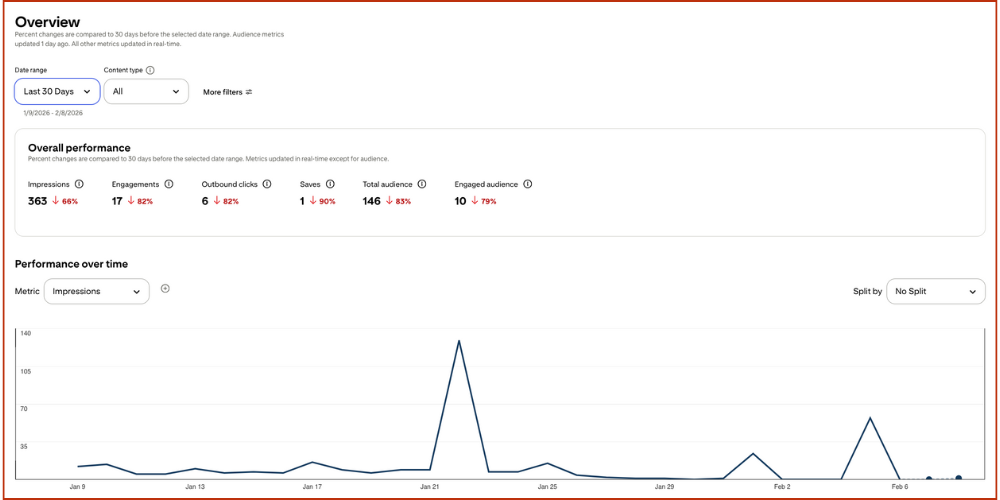
Most accounts don’t see meaningful traffic in the first 30 days. Pinterest uses that time to test, tag, and categorize your pins. If you quit during this phase, Pinterest never gets the chance to actually work for you.
This is where most people lose. They expect Instagram speed from a platform built for compound growth.
Here’s what actually happens when you quit at day 30:
You waste the 30 days Pinterest spent learning your content and audience.
Your competitor who started the same day as you? They hit 10K sessions at day 90 while you’re back at square one, complaining that “Pinterest doesn’t work.”
You reinforce the belief that Pinterest is broken instead of realizing you didn’t give it enough time.
Every day you quit early, you hand traffic to someone with slightly more patience than you.
What Pinterest Does in the First 30 Days
Pinterest Is Profiling You (Politely)
During the first month, Pinterest focuses on learning, not rewarding. It analyzes your pin titles and descriptions, your boards and how they connect, the URLs you link to, and how users interact with your content.
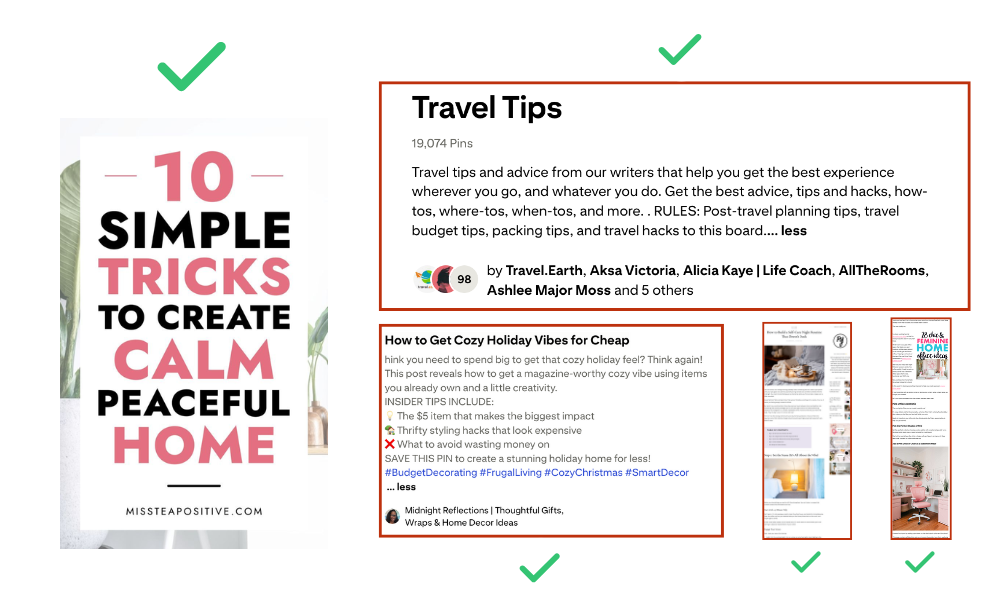
Pinterest assigns something called annotations, which act like internal interest tags. These annotations tell Pinterest what your content relates to and which user interests it fits into. If your metadata feels messy or vague, Pinterest struggles to place you in the right categories.
This phase explains why impressions look completely random early on. Pinterest tries different audiences, then pulls back when engagement drops. That’s normal behavior, not a shadowban.
Early Signals Matter More Than Raw Traffic
Pinterest cares less about raw clicks early on and more about behavioral signals like saves, time spent viewing a pin, and click satisfaction—meaning, did the user bounce immediately or stick around?
If your pins attract the wrong audience, Pinterest notices fast. If your content aligns with planning, inspiration, or visual ideas, Pinterest starts pushing harder.
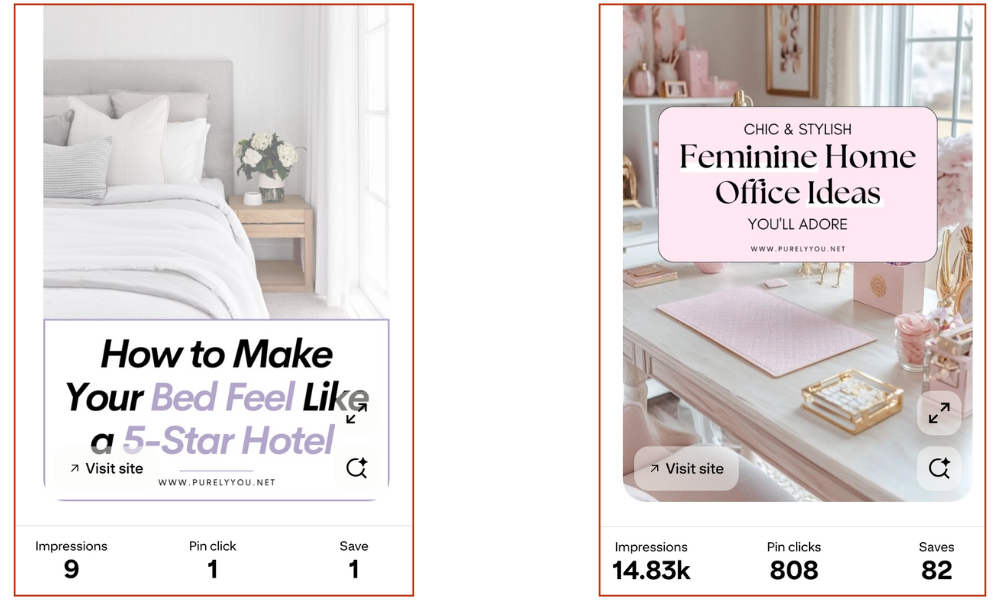
This explains why “pretty pins” sometimes rack up impressions but get zero clicks. They attract browsers, not clickers. Pinterest files that behavior away and adjusts distribution accordingly.
Months 2–3: The “Is This Working?” Phase
This phase feels confusing as hell. Traffic shows up one day and vanishes the next. Some pins randomly take off while others flop for no clear reason. Pinterest is still testing, but it’s testing faster now.
During months two and three, Pinterest expands distribution to related interests, compares your pins against competitors in the same space, and learns which of your URLs perform best.
If your content matches Pinterest user intent—meaning people who plan, collect ideas, and want visuals—growth starts to stabilize. If your content feels too Google-style or text-heavy, growth stalls hard.
Ask yourself this: Would someone ever need a picture for this topic?
If the answer feels shaky, Pinterest probably feels the same way.
Why Some Accounts “Suddenly” Take Off
Pinterest growth rarely depends on time alone. It usually depends on volume thresholds.
Accounts that publish more URLs give Pinterest more data to work with. More URLs mean more testing opportunities, more chances to hit the right audience, and faster feedback loops.
This explains why some blogs flatline for months, then seemingly jump out of nowhere. Pinterest didn’t wake up feeling generous. It finally saw enough evidence to trust the account.
Quantity alone doesn’t win, but strategic volume absolutely speeds everything up.
The 4–6 Month Sweet Spot (Where Pinterest Shines)
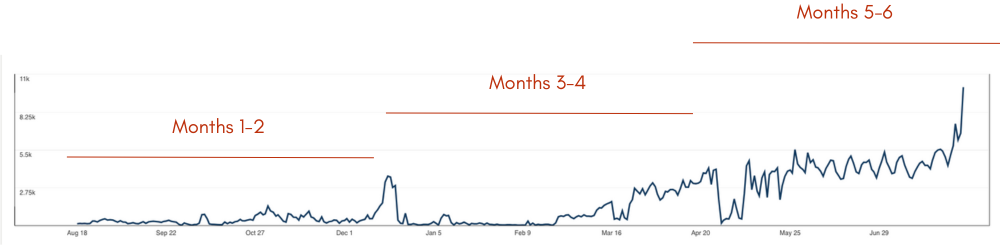
This is where Pinterest starts to feel worth it. Pins age like fine wine. Data compounds. Old content resurfaces without you touching it. Traffic feels less emotional and more predictable.
At this stage, winning topics start repeating themselves, boards gain context and authority, and Pinterest simply trusts your account more.
Growth still fluctuates—especially with seasonality—but the floor rises. Pinterest stops feeling random and starts feeling boring. And boring traffic usually pays the bills.
Why Seasonality Changes the Timeline
Pinterest now prioritizes seasonal content harder than ever before. Evergreen pins still work, but they dip during high-season periods when Pinterest shifts attention to trending topics.
That dip doesn’t mean failure. It means Pinterest is reallocating distribution to what users are actively searching for right now.
Smart accounts plan for spikes during relevant seasons, predictable lulls between seasons, and evergreen traffic recovery afterward.
If you ignore seasonality, Pinterest feels wildly unpredictable. If you embrace it, Pinterest starts feeling scheduled and manageable.
The Real Reason Pinterest “Doesn’t Work” for Most People
Pinterest doesn’t punish effort. It punishes misaligned expectations.
Most creators post Google-style content that answers text-based questions, expect social media speed from a search engine, and quit right before compounding starts.
Pinterest rewards alignment, patience, and clarity. When those three things line up, timelines suddenly make perfect sense.
New vs. Established Accounts
Pinterest doesn’t treat every account the same. A brand-new account and a three-year-old account live in completely different universes, even if they post the exact same pin.
If your Pinterest account is new: Pinterest needs more time because it has less historical data. That means you need more proof through saves, clicks, and consistency. You need more content testing before Pinterest locks onto your audience. You’ll usually see slower momentum in the first 60-90 days.
New account reality check—Pinterest might start distributing your pins, then pull back, then push again. It’s not being dramatic. It’s training its algorithm on your specific account behavior.
If your Pinterest account is established: Older accounts can rank faster because Pinterest already understands your niche cluster, your audience behavior, and your historical winners.
But here’s the annoying part: older accounts can also feel stuck if they accidentally trained Pinterest on the wrong stuff years ago.
If your boards are messy or your old pins attracted low-click audiences, Pinterest keeps serving you to the wrong crowd.
New accounts need time. Old accounts sometimes need a strategic cleanup.
Key insight—if you have an old account stuck at 2,000 monthly sessions for a year, the problem isn’t Pinterest. The problem is Pinterest learned the wrong patterns from you.
Realistic Pinterest Benchmarks
Let’s set expectations that won’t destroy your mental health.
What “Progress” Looks Like in Months 1-2
In the early phase, track signals instead of just traffic. You want to see impressions rising slowly as Pinterest tests distribution, saves increasing because Pinterest sees value in your content, outbound clicks showing up sporadically as audience fit starts forming, and a few pins getting 10x more reach than others.
If you see any pins outperforming, that’s a massive win. Pinterest just handed you a map showing what works. Most people ignore it because the numbers aren’t “big enough” yet.
What “Working” Looks Like in Months 3-4
Now you want to see more consistent outbound clicks week to week, your top topics repeating as winners instead of random one-offs, and more pins ranking for the same keyword family—not just one lucky hit.
This is when the compounding effect starts showing up in a way you can actually feel in your traffic dashboard.
What “Scaling” Looks Like in Months 5-6
At this stage, expect your traffic baseline to rise even during slower weeks, old pins to resurface and contribute without you touching them, and new pins to rank faster because Pinterest already understands your content style and audience.
This is when Pinterest shifts from “experiment” to “system.”
RELATED BLOG POST: The Ultimate Pinterest SEO Guide for Bloggers
The Fastest Way to Speed Up Pinterest
I’m going to be blunt: Pinterest rewards clarity plus volume. Not spam volume—smart, strategic volume.
1. Publish More URLs (Strategically)
Pinterest growth often correlates directly with how many URLs you give it to distribute. More URLs equals more testing, which equals faster learning.
The smart way to do it: publish shorter, high-intent posts first, then expand the winners later. Create multiple posts that attack the same broad category from different angles.
Pinterest isn’t Google. It doesn’t force one page to “win” while the others die in obscurity. You can have multiple URLs winning simultaneously for related searches.
2. Use Pinterest-Friendly Intent (This One Is Non-Negotiable)
Pinterest users plan. They collect ideas. They want visuals they can save and reference later.
The content that wins on Pinterest looks like checklists, templates, “ideas” posts, step-by-step visuals, quick fixes, and swipeable examples.
If your topic feels like a pure text answer better suited for Google, Pinterest will treat it like homework. And nobody opens Pinterest to do homework.
3. Use Annotations Like a Secret Weapon
Pinterest assigns internal interest tags to every single pin. If you include those exact phrases naturally in your descriptions, you make Pinterest’s job incredibly easy.
That means your pin can appear in search results, related pins sections, home feed recommendations, and dedicated interest pages.
This is the difference between “I used keywords” and “Pinterest actually understands what the hell I’m talking about.”
The Click vs Save Trap
Pinterest loves saves. Saves fuel distribution and signal value. But saves don’t pay your bills if nobody actually clicks through to your site.
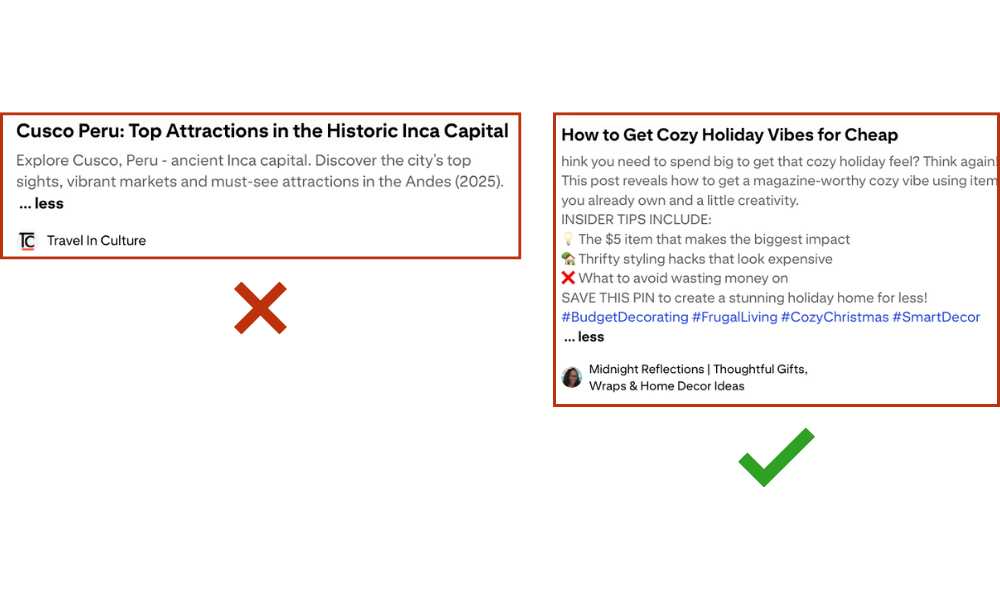
Some niches get stuck in what I call “pretty pin prison,” where pins get tons of impressions and saves but zero outbound clicks.
You fix this with click-intent pin framing.
Make Your Pin Promise the “Next Step”
Instead of fully satisfying the user on the pin itself, tease the value waiting on your site. Use phrases like “the 7-step checklist inside,” “template included,” “exact settings plus screenshots,” “copy-paste guide,” or “mistakes to avoid.”
Give enough value to earn a save, but hold back enough to create genuine curiosity.
Ever saved a pin because it looked useful, but you didn’t click because the pin already told you everything you needed? Yeah. Don’t do that to your own traffic.
What a Real 6-Month Pinterest Plan Actually Looks Like
Month 1: Foundation Plus Testing
Optimize your profile and boards for your specific niche. Build a keyword and annotation bank you can reference. Publish consistent pins without going crazy in one single day. Start with your most Pinterest-friendly posts—the ones people would naturally want to save.
Goal: Teach Pinterest what you are and who you serve.
Month 2: Expand What’s Already Working
Identify your top-performing topics from month one. Create more pins for those exact topics using different designs. Improve your pin design based on what’s getting saves and clicks. Tighten your descriptions using annotations you’ve found in top-performing pins.
Goal: Get Pinterest to lock in on what works instead of still testing randomly.
Month 3: Systemize and Double Down
Create content clusters where you have multiple posts per category. Build board structure that matches those clusters for better topical authority. Add seasonal pin variations 8-12 weeks ahead of the actual season.
Goal: Build momentum and coverage across your niche.
Month 4: Optimize Like a Machine
Refresh old pins that are showing traction by creating new designs. Make new pin angles for existing winner URLs. Improve your landing pages for conversion rate optimization because high bounce rate kills Pinterest distribution.
Goal: Raise click satisfaction so Pinterest rewards you with more reach.
Month 5: Scale Output Without Burning Out
Repurpose winners into new formats like carousels, checklists, or templates. Publish more URLs if possible while maintaining quality. Keep your pinning schedule consistent even when life gets busy.
Goal: Increase testing volume while keeping quality high enough that Pinterest still trusts you.
Month 6: Compounding Plus Predictable Growth
Track winners by topic and theme, not by individual pin performance. Build a seasonal content calendar so you’re never scrambling. Stabilize your content pipeline so Pinterest becomes reliable, not chaotic.
Goal: Turn Pinterest into a dependable traffic source you can actually plan around.
What to Do If You’re Still Stuck After 60-90 Days
Before you decide Pinterest hates you personally, check these five things:
Do you have enough URLs? Pinterest needs inventory to distribute. If you only have 10 blog posts, Pinterest runs out of things to test quickly.
Do your pins match planning and ideas intent? Pinterest-first content wins. Google-style Q&A content struggles.
Do your descriptions include real interests and annotations? Pinterest needs categorization help. Vague descriptions confuse the algorithm.
Do your landing pages satisfy the click promise? High bounce rate signals to Pinterest that your content disappointed users. That kills future distribution.
Did you pin too much too fast early on? Rapid bursts of 50 pins in one day can reduce reach. Pinterest prefers consistency over volume spikes.
Most “Pinterest isn’t working for me” situations come down to one of these five issues. Not bad luck. Not being shadowbanned. Just misalignment.
The Real Timeline
Pinterest rewards consistency and clarity over time. Most people quit right before the compounding effect starts, which is honestly tragic to watch.
If you stay consistent for three to six months, build Pinterest-friendly content that people actually want to save, and use keywords plus annotations correctly, Pinterest starts behaving like a predictable system instead of a chaotic slot machine.
And once it clicks, it keeps working while you do literally anything else. That’s the entire point of Pinterest as a traffic source.
The bloggers making thousands of monthly sessions from Pinterest? They’re not special. They’re not lucky. They just didn’t quit at day 45.
Not Sure Where You Are on the Timeline?
Reading guides helps — but Pinterest problems are rarely generic.
Two accounts can post the same number of pins and get completely different results because Pinterest categorizes them differently.
That’s why guessing usually wastes months.
I created a free Pinterest audit where I record a short Loom video reviewing your account and show you:
- what stage your account is actually in
- what’s blocking distribution right now
- the fastest realistic path to traffic based on your niche
No templates. No automated report. Just a clear explanation of what Pinterest currently thinks your account is.
Request your free Pinterest audit here:
https://amsocials.com/free-pinterest-audit/
Frequently Asked Questions
Can Pinterest really work in just 30 days?
It can, but most accounts only see early signals in 30 days—things like impressions, saves, and small click spikes. Real consistent traffic usually shows up closer to months two and three. The 30-day success stories you see online usually come from accounts that already had authority or massive volume going in.
Why do my Pinterest impressions go up but clicks stay low?
Your pins likely attract “savers” more than “clickers,” or your pin design satisfies the user’s intent without them needing to click through. Add curiosity to your pin copy, promise a valuable next step, and make sure you’re targeting click-intent topics instead of just pretty inspiration boards.
How do I make Pinterest work faster without spamming?
Publish more Pinterest-friendly URLs so the algorithm has more to test. Create multiple pin variations for your best content. Use the exact interests and annotations Pinterest assigns to your winning pins. Most importantly, make sure your landing page doesn’t disappoint after the click—high bounce rate kills distribution fast.
What if I’m stuck after 90 days and still not seeing real traffic?
Audit these five things: URL count (do you have enough content?), intent alignment (is your content Pinterest-friendly?), keyword usage (are you using annotations?), landing page quality (are people bouncing?), and pinning consistency (are you posting in bursts or steadily?). One of these is almost always the blocker.
How many pins should I post per day for faster growth?
Aim for 5-10 new pins per day. Consistency beats volume. Posting 50 pins in one day and then nothing for a week trains Pinterest that you’re unreliable. Steady daily pinning (even just five pins) builds trust and compounds faster.
Should I focus on evergreen or seasonal content first?
Start with evergreen to build your baseline, then layer in seasonal content 8-12 weeks before the season hits. Seasonal content can explode your traffic during peak times, but evergreen content keeps you stable between seasons. You need both for predictable growth.
Can I speed up Pinterest growth with paid ads?
Yes, but only after you’ve proven your organic strategy works. If your organic pins aren’t getting saves and clicks, paid ads will just amplify a broken strategy. Fix your content and pin design first, then use ads to scale what’s already working.



Leave a comment