
If you’re a blogger, chances are Google has stressed you out at least once. Maybe your traffic dipped. Maybe it disappeared overnight.
Or maybe you’re just tired of building your entire income on a platform that changes the rules whenever it feels like it.
That’s why I started taking Pinterest seriously—not as a side tool or a “nice bonus,” but as a real, reliable traffic source that doesn’t vanish with every algorithm update.
Pinterest SEO completely changed how I think about driving traffic. It’s not about chasing trends or posting non-stop.
It’s about keywords, structure, and creating content that’s genuinely useful. Once I got that, the traffic started rolling in.
If you’re ready for a platform that actually works with you instead of against you, you’re in the right place.
Before we dive in, here’s a quick snapshot of what you’ll learn in this guide. Think of it as your cheat sheet for Pinterest SEO success:
Key Takeaways
| Main Insight | Explanation |
|---|---|
| Create an SEO-Friendly Profile | Optimize your Pinterest profile with keywords, a clear username, and a compelling bio to enhance search visibility. |
| Use High-Impact Keywords | Research effective keywords using Pinterest’s search bar to improve content discoverability and target the right audience. |
| Design Eye-Catching Pins | Create visually appealing pins with specific dimensions, clear text overlays, and high-quality images to boost click-through rates. |
| Optimize Descriptions and Boards | Write keyword-rich descriptions and targeted board titles to help users and search algorithms find your content more easily. |
| Monitor and Adjust Strategies | Regularly review Pinterest Analytics to identify trends and refine your content and design strategies based on performance data. |
Step 1: Set Up a Pinterest Profile That Works for You
Let’s get down to business—your profile should pull in the right crowd from the start. Picture it as the front door to your entire blog setup.
When you dial in your profile just right, you make it clear to both Pinterest and your future audience exactly what you bring to the table.
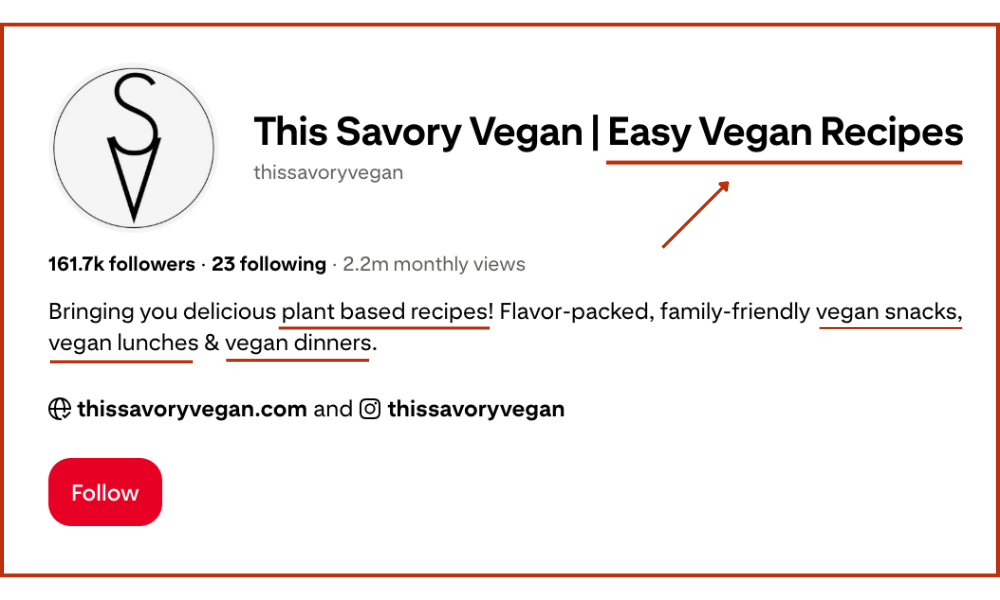
Start strong with a straightforward username that fits your blog’s brand. Make sure your profile name works in a main keyword.
For example, if you’re running a food blog, don’t go with something plain like “Mike’s Kitchen”—go all in with “Mike’s Kitchen | Easy Grill Recipes.” That instantly sets expectations and attracts the right crowd.
Next, write a bio that gets straight to the point. Keep it tight, plug in your main keywords, and lay out exactly who you help and what you do. Treat it like your online elevator pitch—make every word count.
Don’t skip the step where you claim your website. This unlocks Rich Pins—seriously powerful stuff that pulls real info like your blog post titles right from your site, so your pins stand out and look legit.
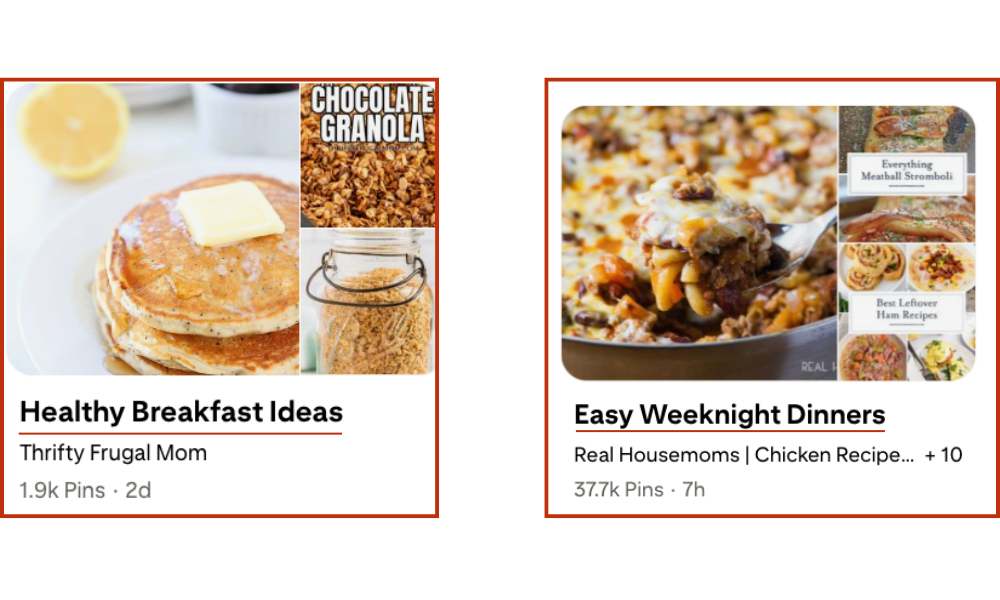
Pro Tip: Your boards are prime real estate for SEO. Instead of generic names like “Food,” get specific with keyword-focused titles like “30-Minute Weeknight Dinners” or “Healthy Breakfast Ideas.” Each board is another chance to show up in search results.
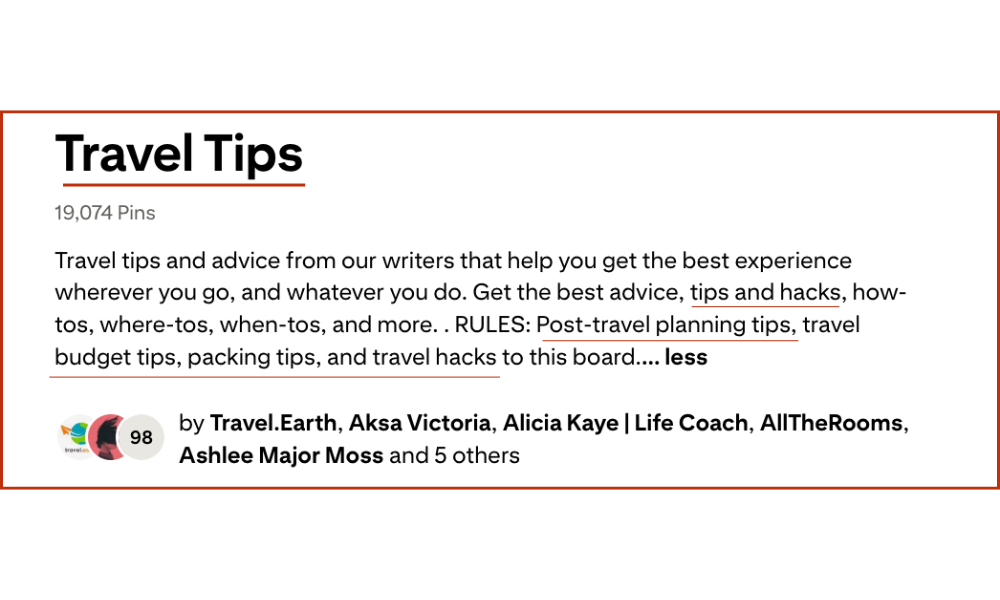
Make sure each board has a clear, keyword-packed description that spells out exactly what people will find there. The more targeted your boards, the higher your whole profile climbs in search.
Step 2: Find Keywords People Are Actually Searching For
Keywords are your go-to tool for getting noticed on Pinterest. Pick the right ones, and you’re dialing straight into the crowd that actually wants your content.
The good news? Pinterest hands you what people are really searching for—no guesswork.
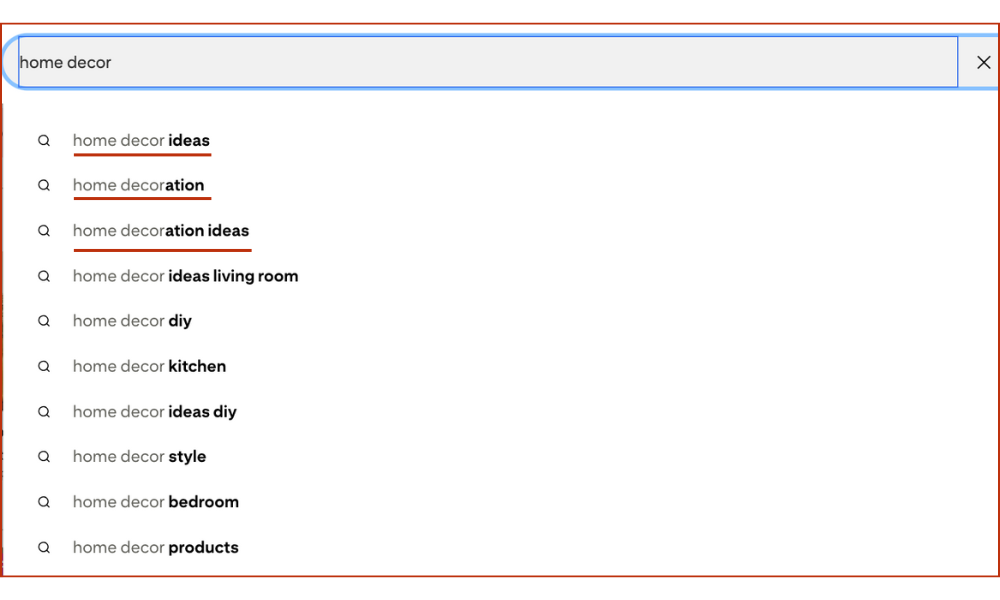
Start by typing a broad topic in the Pinterest search bar. As you type, you’ll get a dropdown list of suggestions—these aren’t random, they’re exactly what real people are searching for.
For example, if you type “home decor,” you might see stuff like “home decor ideas living room,” “home decor on a budget,” or “home decor modern.” That’s your call list for killer keywords.
Zero in on long-tail keywords—those three-or-more word phrases that hit a specific target. They’re your ticket to less competition and a more dialed-in audience.
Keep it simple: throw your best finds into a spreadsheet, jot down why they matter, and note how you might use them for your next blog post or pin.
Pro Tip: Think seasonally! People search for “fall recipes” in August and “spring cleaning tips” in February. Align your content with these trends using Pinterest Trends to stay ahead of the curve and capture timely traffic.
Step 3: Design Pins That Demand a Click
Your pin graphic is what grabs attention and stops people from scrolling right past. Solid design is what sets apart the pins that nobody notices from the ones that blow up and bring thousands of clicks to your blog.
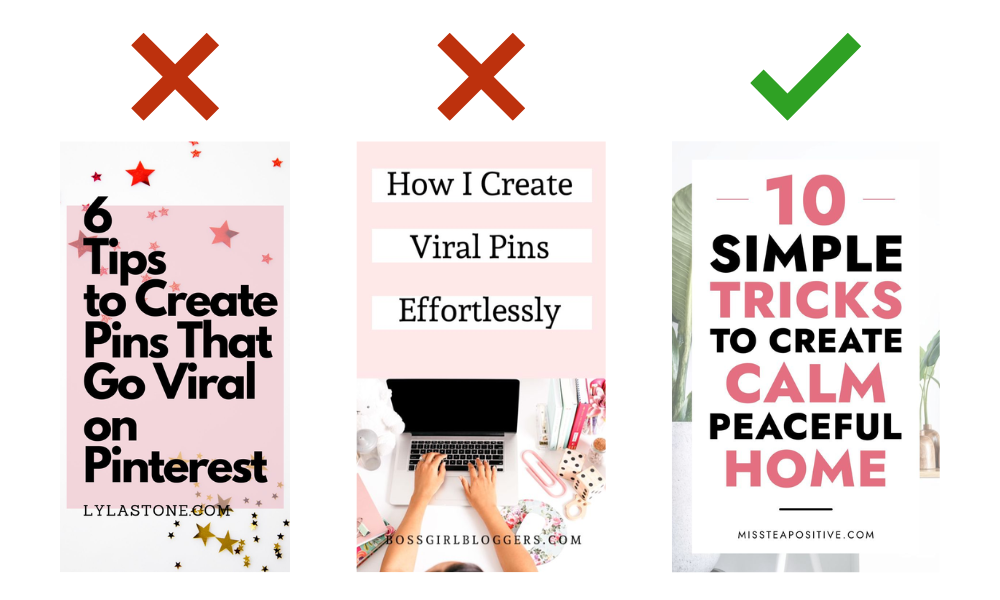
Stick to a vertical layout—1000×1500 pixels is the sweet spot. It grabs more screen space, looks sharp on mobile, and just plain works. Use bold, high-quality images that line up with your blog’s vibe.
Drop a text overlay on your pin with a punchy hook—make sure it grabs your attention and works in your target keyword. Use a bold, no-nonsense font that stands out.
Ask yourself, what would actually get you to click? For example, something like “How I Pulled 70K Clicks With One Pin” is way more tempting than any random photo.
And here’s a move most people miss—rename your image files before you upload. Don’t leave it as some random IMG_1234.jpg; switch it up to something like pinterest-seo-tips-for-bloggers.jpg. That little step actually helps Pinterest figure out what your pin’s about.
Step 4: Write descriptions that get you discovered
Pin descriptions and how you set up your boards are a big deal for SEO. They let both your audience and Pinterest’s algorithm know exactly what you’re about, plain and simple.
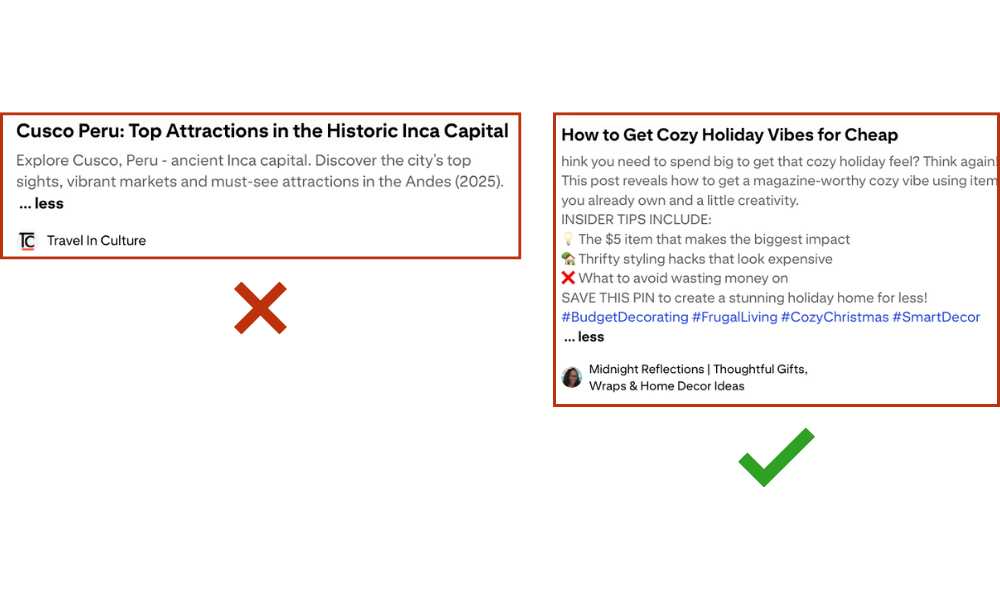
You get 500 characters for your pin description—don’t waste ’em. Write it straight, work in your main keywords and related phrases, and keep it sounding natural.
Share something real, ask a question, or toss in a quick story to catch interest. Always close by telling them exactly what to do next, like “Hit the link to check out the full post and grab your free checklist!”
Step 5: Use Your Analytics Like a Power Tool
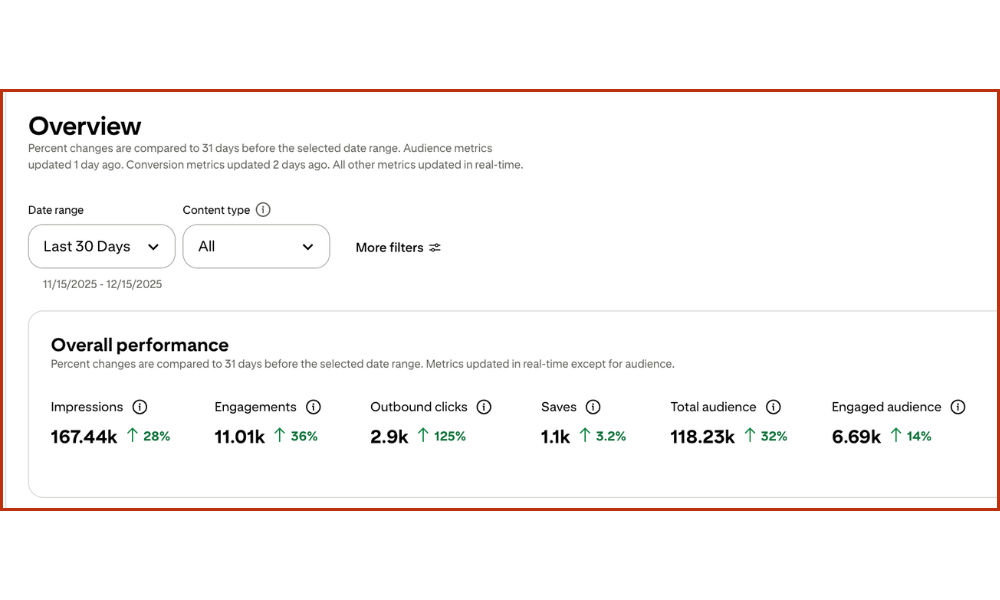
Numbers don’t lie. Pinterest Analytics is your no-BS way to figure out what’s crushing it and what’s falling flat, so you can quit guessing and start making moves that actually work.
Check your analytics often and see which pins are pulling in the most impressions, saves, and outbound clicks.
Pick up on the patterns—maybe certain colors, bold headlines, or topics really hit home with your audience. This kind of insight is the stuff that gives you an edge.
Use these numbers to sharpen your game plan. Double down on the content and pin styles that are really making an impact.
Build out more posts around your top-performing topics and design pins that follow your proven winners.
If one pin racks up 1,000+ clicks in a month, break down what made it hit and repeat that formula wherever you can.
Pro Tip: Set up a simple spreadsheet to track your key metrics monthly. Watching your growth over time is not only motivating but also helps you spot long-term trends and adjust your strategy effectively.
Let’s Make Pinterest Work for You
Tired of trying every Pinterest tip and still not seeing real results? You’re creating amazing content, but the traffic just isn’t coming.
I help bloggers turn Pinterest into their #1 source of consistent, reliable traffic. From strategy and pin design to full account management, I handle the heavy lifting—so you can focus on what you love: creating content.
Ready to finally make Pinterest work as hard as you do? Check out my services here and let’s start growing your traffic the smart way.
Frequently Asked Questions
How do I create an SEO-friendly Pinterest profile for my blog?
Use a memorable username that reflects your brand. Include primary keywords in your profile name and bio. Claim your website, use a professional profile picture, and create boards with descriptive, keyword-rich titles.
What keywords should I use on Pinterest to get traffic?
Focus on long-tail keywords specific to your niche. Use Pinterest’s search bar to find suggestions that real users are searching for. Track relevant keywords and incorporate them into your pin titles, descriptions, and board names.
What makes a Pinterest pin click-worthy?
Design vertical pins (1000×1500 pixels) with high-quality images. Add a bold text overlay that includes a keyword and a compelling hook. And don’t forget to use a descriptive filename before you upload!
How do I optimize my pin descriptions and boards?
Use the full 500 characters for your pin descriptions, writing in a natural, conversational tone while including keywords. Create niche-specific boards with clear, targeted titles and descriptions.
How can I use Pinterest Analytics to improve my SEO?
Regularly check your analytics to identify your top-performing pins and boards. Look for trends in design, topics, and keywords that resonate with your audience. Use these insights to guide your future content strategy.
How often should I update my Pinterest keyword strategy?
Review and refresh your keyword strategy quarterly. Pinterest trends change, so staying current ensures your content remains discoverable and relevant to your target audience.


Leave a comment